
基于湖库一体架构,统一管理结构化、半结构化与非结构化等多模态数据,一个系统承载事务处理、实时分析与 AI 工作负载。


堡垒机集成
更新时间:2026-05-19 09:30:54
编辑
分享
背景信息
什么是堡垒机
堡垒机是一种运维安全审计系统,为了保障网络和数据不受外部和内部用户的入侵和破坏,可以通过堡垒机访问 ODC 以监控和记录运维人员对 ODC 的操作行为。
什么是 OceanBase 开发者中心
OceanBase 开发者中心(OceanBase Developer Center,ODC)是为 OceanBase 数据库量身打造的企业级数据库开发平台。ODC 支持连接 OceanBase 中 MySQL 和 Oracle 模式下的数据库,同时为数据库开发者提供了数据库日常开发操作、WebSQL、SQL 诊断、会话管理和数据导入导出等功能。ODC 采用成熟的浏览器-服务端架构,拥有跨平台、轻量化和易部署的特点。同时,ODC 还提供客户端版本,不仅能满足个人开发者快速上手使用 OceanBase 的需求,还可提升开发人员与 DBA 的协作效率。
应用场景
ODC 提供桌面版和 Web 版两种产品形态。
桌面版支持 Windows 和 MacOS 操作系统。
Web 版支持 X86/ARM 架构。
ODC Web 版支持堡垒机集成,ODC Web 版内置账号体系,因此在集成时需配置外部账号服务。Web 版支持场景如下表所示:
| 支持场景 | 说明 |
|---|---|
| 跳转到登录页 | 跳转后用户需自行填入 ODC 账号密码登录 ODC; 管理员可通过公共连接分配权限,普通用户不需要掌握数据库帐密。 |
| 跳转到连接列表页 | 需配置账号集成; 管理员可通过公共连接分配权限,普通用户不需要掌握数据库帐密。 |
| 跳转进入临时连接 | 需配置账号集成,跳转参数需包含数据库连接配置。 |
原理介绍
堡垒机跳转过程
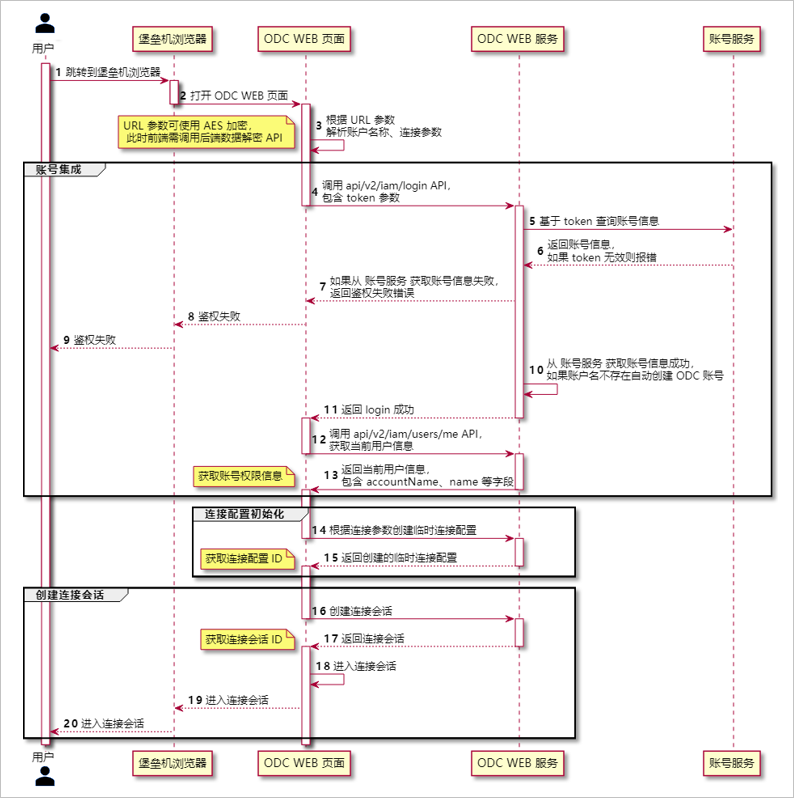
上述跳转过程涉及参数传递、账号集成、连接配置创建等环节,此类环节的具体流程由 ODC 内部处理,调用端只需根据本堡垒机集成参考内容在跳转到 ODC 的 URL 内包含参数即可。
账号集成和安全鉴权
考虑到 URL 参数可能泄漏,为避免 URL 泄漏导致的权限泄漏,跳转过程包含以下安全相关设计。
URL 参数加密算法和加密密钥可配置。
部署时,确保堡垒机传参、ODC 使用相同的密钥。
加密算法可选值包括:RAW 不加密;AES256_BASE64 使用 AES-256 加密算法,设置的密钥作为 SEED 生成实际的 KeySecret。
跳转参数包含账号查询 API 访问 Token,ODC 基于该 Token 验证账号身份有效性。
Token 只能单次使用,再次使用无效。
跳转时 ODC 会调用用户查询 API,验证 Token 是否有效、获取账户信息(包括姓名、昵称等信息):查询账户信息成功则自动登录 ODC 成功,若查询无此账号则 ODC 会自动创建;查询账户信息失败则自动登录失败。
连接配置维护
跳转 URL 参数中可包含连接配置参数。
参数包含连接配置时,跳转到 ODC 后 ODC 会自动创建响应的临时连接并打开该连接进入 SQL 控制台。
参数不包含连接配置时,跳转到 ODC 后 ODC 会进入首页连接列表页。
客户端版 ODC:用户可自行添加连接配置。
Web 版 ODC:管理员可通过配置公共连接并分配权限给普通用户。
调用方式
调用地址语法:
${odc_site}/#/gateway/${param}
示例:
ODC 地址为 http://xxx.xxx.x.x:2883,参数为 abc, 对应跳转地址为 http://xxx.xxx.x.x:2883/#/gateway/abc。
调用示例代码:
// Web 页面内 JavaScript 调用跳转到 ODC
window.open('xxx.xxx.x.x:2883/#/gateway/' + param)

// chrome 唤起
chrome.exe --new-window xxx.xxx.x.x:2883/#/gateway/param
参数说明
参数形式为 Base64 编码之后的 JSON 字符串 。
{
 action: string, // 类型
  data: any, // 调用参数(加密情况下,需要先序列化成一个字符串,非加密情况,直接传递下方表格对应的参数类型)
  encrypt: boolean // 参数是否加密
}
其中,由三部分组成的参数说明如下:
| 参数 | 说明 |
|---|---|
| action | 类型。 |
| data | 调用参数。 加密情况下,需要先序列化成一个字符串;非加密情况下,直接传递下方表格对应的参数类型。 |
| encrypt | 是否加密。 |
action 类型
action: string
| 可选值值 | 作用 |
|---|---|
| start | 启动 ODC。 |
| newTempSession | 创建连接。 |
data 调用参数
data: any
| action | 值类型 | 值 | 备注 |
|---|---|---|---|
| start | JSON(可选) | accountVerifyToken string | 账户登录凭证,可选:
|
| newTempSession | JSON | accountVerifyToken string | 外部账号集成场景必填,登录凭证 |
| newTempSession | JSON | type 'OB_ORACLE' | 'OB_MYSQL' | 数据库类型 ,必填 |
| newTempSession | JSON | clusterName string | 集群名称,非必填,unionDbUser 不为空时无效 |
| newTempSession | JSON | username string | 数据库用户名,unionDbUser 为空时必填 |
| newTempSession | JSON | tenantName string | 租户名称,unionDbUser 为空时必填 |
| newTempSession | JSON | unionDbUser string | 混合的集群用户名与租户信息,有这个参数就不需要单独传集群,租户和用户信息。 例:username@tenant#clusterName 或 obdemo:obmysql:username |
| newTempSession | JSON | defaultSchema string | 默认数据库(Oracle 默认取用户名) |
| newTempSession | JSON | host string | 主机 IP/域名,必填 |
| newTempSession | JSON | password string | 数据库密码,必填 |
| newTempSession | JSON | port string | 端口,必填 |
| newTempSession | JSON | sysTenantUsername string | sys 租户账号,非必填 |
| newTempSession | JSON | sysTenantPassword string | sys 租户密码,非必填 |
| newTempSession | JSON | properties map | 连接的自定义配置字段,ODC 不理解 properties 内字段的值,用于集成方案的扩展功能,非必填。 |
encrypt 是否加密
encrypt: boolean
标注参数中的 data 字段值是否加密。
true:加密
false: 不加密
操作步骤
步骤一:部署 Web 版 ODC
堡垒机集成支持 Web 版 ODC V4.2.3 及之后的版本,具体请参见 部署 Web 版 ODC。
Web 版 ODC 部署环境要求请参见使用限制。
步骤二:模拟堡垒机账号服务
ODC 堡垒集成是通过调用堡垒机账号服务 API 查询用户账号信息。此 API 信息需要用户配置在 ODC 元数据库中。
本章节以使用 moco 模拟堡垒机服务为例,接收 ODC 的请求、返回堡垒机用户信息。
通过配置文件,使用 JAR 包启动 moco,模拟 Web 服务。
一个模拟堡垒机账号服务的 moco 配置文件如下所示:
[
    {
        "description": "query bastion user 1",
        "request": {
            "method": "post",
            "uri": "/api/queryUser",
            "text": {
                "json": "{\"accountVerifyToken\":\"token_1\"}"
            }
        },
        "response": {
            "json": {
                "resultCode": 0,
                "userCode": "test_bastion_account_1",
                "userName": "测试账号-1"
            }
        }
    },
    {
        "description": "query bastion user 2",
        "request": {
            "method": "post",
            "uri": "/api/queryUser",
            "text": {
                "json": "{\"accountVerifyToken\":\"token_2\"}"
            }
        },
        "response": {
            "json": {
                "resultCode": 0,
                "userCode": "test_bastion_account_2",
                "userName": "测试账号-2"
            }
        }
    }
]
配置文件中模拟了两个请求的响应,您可以分别查询两个不同的堡垒机用户。
前端调用时,
accountVerifyToken分别赋值为token_1和token_2,返回名为test_bastion_account_1和test_bastion_account_2的用户信息。通过一台机器(假设 IP 为 xx.xx.xx.xx,堡垒机配置时会使用此 IP),执行以下命令,在机器的 ***** 端口启动 moco 服务,以完成模拟堡垒机账号服务。
nohup java -jar moco-runner-1.4.0-standalone.jar http -p ***** -c moco-bastion.json &
步骤三:配置 ODC 堡垒机集成
执行以下脚本修改堡垒机集成元数据配置。
注意
部分配置项需要重启 ODC 才能生效。
-- 启用堡垒机集成
update `config_system_configuration` set `value` = 'true' where `key` = 'odc.integration.bastion.enabled';

-- 加密配置:这里是模拟服务,配置为不加密
update `config_system_configuration` set `value` = 'false' where `key` = 'odc.integration.bastion.encryption.enabled';
update `config_system_configuration` set `value` = 'RAW' where `key` = 'odc.integration.bastion.encryption.algorithm';
update `config_system_configuration` set `value` = '' where `key` = 'odc.integration.bastion.encryption.secret';

-- 账号配置:启用自动登录
update `config_system_configuration` set `value` = 'true' where `key` = 'odc.integration.bastion.account.auto-login-enabled';

-- 查询堡垒机账号 API 配置,这里使用 3.2 节模拟的服务。注意 API 配置要与模拟服务相对应
update `config_system_configuration` set `value` = 'POST' where `key` = 'odc.integration.bastion.account.query.request-method';
update `config_system_configuration` set `value` = 'http://xx.xx.xx.xx:*****/api/queryUser' where `key` = 'odc.integration.bastion.account.query.request-url';
update `config_system_configuration` set `value` = 'Content-Type=application/json;charset=UTF-8,Accept=application/json' where `key` = 'odc.integration.bastion.account.query.request-headers';
update `config_system_configuration` set `value` = '{"accountVerifyToken":"${account_verify_token}"}' where `key` = 'odc.integration.bastion.account.query.request-body';
update `config_system_configuration` set `value` = 'false' where `key` = 'odc.integration.bastion.account.query.request-encrypted';
update `config_system_configuration` set `value` = '[''resultCode''] == 0' where `key` = 'odc.integration.bastion.account.query.response-body-valid-expression';
update `config_system_configuration` set `value` = '[''userCode'']' where `key` = 'odc.integration.bastion.account.query.response-body-username-extract-expression';
update `config_system_configuration` set `value` = '[''userName'']' where `key` = 'odc.integration.bastion.account.query.response-body-nickname-extract-expression';
update `config_system_configuration` set `value` = 'false' where `key` = 'odc.integration.bastion.account.query.response-encrypted';

-- HTTP 连接配置
update `config_system_configuration` set `value` = '5' where `key` = 'odc.integration.bastion.account.http.connect-timeout-seconds';
update `config_system_configuration` set `value` = '20' where `key` = 'odc.integration.bastion.account.query.read-timeout-seconds';

-- GET 连接配置
update `config_system_configuration` set `value` = 'http://xx.xx.xx.xx:*****/api/queryUser2?accountVerifyToken=${account_verify_token}' where `key` = 'odc.integration.bastion.account.query.request-url';
update `config_system_configuration` set `value` = '' where `key` = 'odc.integration.bastion.account.query.request-body';
ODC 系统配置维护在 ODC 元数据库的 config_system_configuration 表,配置类型包括:
Web 版账号集成配置, key 统一前缀
odc.integration.bastion.连接配置保留策略,key 前缀
odc.connect.temp.
账号集成相关参数
| key 名称 | 默认值 | 说明 |
|---|---|---|
| odc.integration.bastion.enabled | false | 是否启用堡垒机集成。 默认值:false。 |
| odc.integration.bastion.encryption.enabled | false | 堡垒机集成参数是否加密。 默认值:false。 |
| odc.integration.bastion.encryption.algorithm | RAW | 堡垒机集成参数加密算法。 可选值:RAW、AES256_BASE64,默认值:RAW,表示不加密。 |
| odc.integration.bastion.encryption.secret | <空> | 堡垒机集成参数加密秘钥,当 algorithm 值非 RAW 时有效。 跳转时 data 参数值需使用此秘钥加密后传递,ODC 会使用此密钥对参数值解密。 |
| odc.integration.bastion.account.auto-login-enabled | false | 是否启用账号集成自动登录。默认值:false。 通过堡垒机进行账号集成时需要启用该参数,通过 SSO 进行账号集成时无需启用该参数。 |
| odc.integration.bastion.account.query.request-url | <空> | 账号查询 API 请求 URL,用于堡垒机集成场景 ODC 调用外部服务确认账号信息是否有效。 值可引用模板变量,支持的模板变量包括:${account_verify_token}。 |
| odc.integration.bastion.account.query.request-method | POST | 账号查询 API 请求 方法,用于堡垒机集成场景 ODC 调用外部服务确认账号信息是否有效。可选值:GET/POST/PUT/PATCH,默认值:POST。 |
| odc.integration.bastion.account.query.request-headers | <空> | 账号查询 API 请求 headers,可选。 可配置多个 headers 语法为 Header1=Value1,Header2=Value2 Header 的值可引用模板变量,支持的模板变量包括:${account_verify_token}。 |
| odc.integration.bastion.account.query.request-encrypted | true | 用于判断发送请求时是否对 request body 进行加密。默认值:true,表示加密。 |
| odc.integration.bastion.account.query.response-encrypted | true | 用于控制接收到响应之后,是否对 response body 进行加密。默认值:true,表示加密。 |
| odc.integration.bastion.account.query.request-body | <空> | 账号查询 API 请求 body,值可引用模板变量,支持的模板变量包括:${account_verify_token},为空表示不包含 request body。 |
| odc.integration.bastion.account.query.response-body-valid-expression | true | 账号查询 API 调用成功判断 response body 判定表达式。默认值:true,表示不校验 response body。 |
| odc.integration.bastion.account.query.response-body-username-extract-expression | <空> | 账号查询 API response body 账户名称提取表达式。 |
| odc.integration.bastion.account.query.response-body-nickname-extract-expression | <空> | 账号查询 API response body 账户昵称提取表达式。 |
临时连接配置保留周期参数
| key 名称 | 默认值 | 说明 |
|---|---|---|
| odc.connect.temp.expire-after-inactive-interval-seconds | 86400 | 临时连接不活跃之后的保留周期。 单位:秒,默认值:86400。 |
步骤四:堡垒机登录 ODC
本章节以使用 accountVerifyToken 为 token_1 登录为例,同时自动创建一个数据源进入 SQL 窗口。token_1 对应的用户名为:测试账号-1,账户名为:test_bastion_account_1。
在 ODC gateway 参数生成填写信息后,单击 生成参数串 并复制生成的参数串。
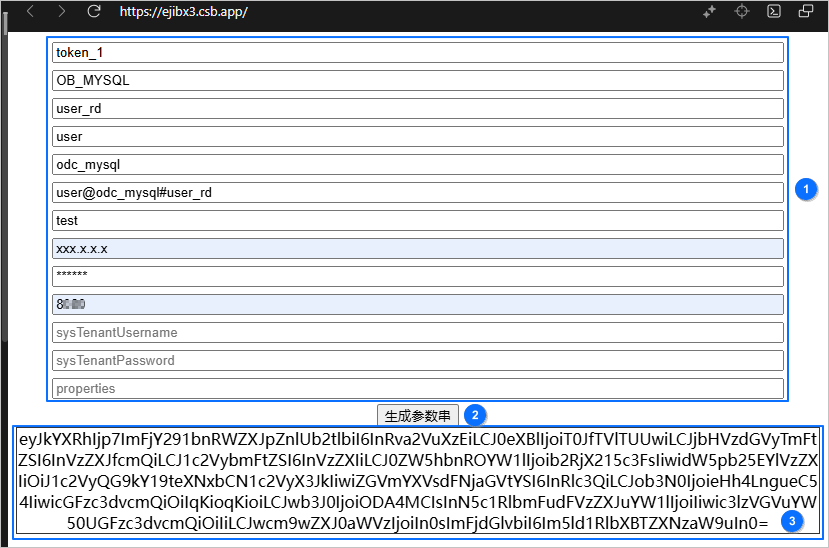
根据调用地址语法(
${odc_site}/#/gateway/${param})拼接 URL,示例如下:http://xx.xx.xx.xx:8080/#/gateway/eyJkYXRhIjp7ImFjY291bnRWZXJpZnlUb2tlbiI6InRva2VuXzEiLCJ0eXBlIjoiT0JfTVlTUUwiLCJjbHVzdGVyTmFtZSI6InVzZXJfcmQiLCJ1c2VybmFtZSI6InVzZXIiLCJ0ZW5hbnROYW1lIjoib2RjX215c3FsIiwidW5pb25EYlVzZXIiOiJ1c2VyQG9kY19teXNxbCN1c2VyX3JkIiwiZGVmYXVsdFNjaGVtYSI6InRlc3QiLCJob3N0IjoieHh4LngueC54IiwicGFzc3dvcmQiOiIqKioqKioiLCJwb3J0IjoiODA4MCIsInN5c1RlbmFudFVzZXJuYW1lIjoiIiwic3lzVGVuYW50UGFzc3dvcmQiOiIiLCJwcm9wZXJ0aWVzIjoiIn0sImFjdGlvbiI6Im5ld1RlbXBTZXNzaW9uIn0=浏览器中输入拼接的 URL 登录 ODC。
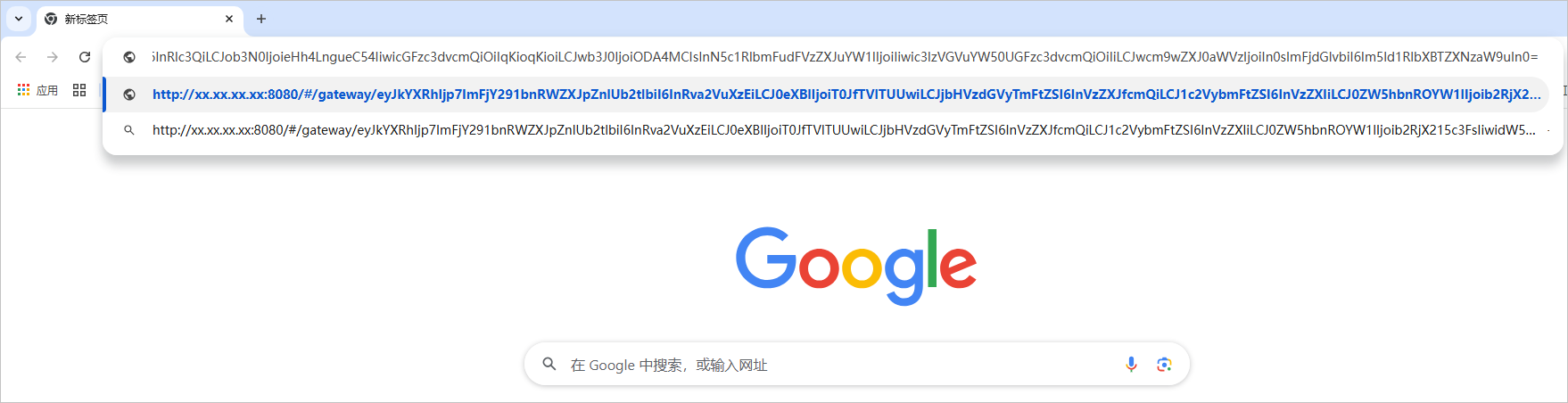
登录成功后,可在该页面进行需要的数据开发工作。为保证数据库的逻辑一致性,堡垒机集成 ODC 仅支持团队空间形式的使用,工单仅支持数据导出和数据库变更相关操作。
调用样例
场景一:跳转到首页连接列表页
此场景不涉及数据库连接配置,只包含 ODC 账号自动登录。
JavaScript 调用示例代码:
// 构造 data 参数
const data = {
 accountVerifyToken: 'token_value'
}

// 构造 ODC 调用参数
const ODCData = {
 action: 'start',
  data: encrypt(JSON.stringify(data)), // 加密数据
  encrypt: true
}

// 把 json 类型转成base64字符串
const param = base64(JSON.stringify(ODCData));

// Web 方式调用 Web 版本 ODC
window.open('xxx.xxx.x.x:2883/#/gateway/' + param)

//chrome 唤起
chrome.exe --new-window xxx.xxx.x.x:2883/#/gateway/param
场景二:跳转时自动创建临时连接配置并进入连接
传入参数包含连接配置时,ODC 会自动创建一个临时连接配置并打开该连接进入到 SQL 窗口。
样例数据库连接配置
数据库类型:Oracle
主机地址:'xxx.xxx.x.x'
端口:2883
用户名:'****'
密码:'*****'
租户:'oracle'
默认库名:'default'
JavaScript 调用示例代码:
// 构造 data 参数
// 注意 properties 内具体的字段和含义 ODC 并不理解,需要和集成的审批、审计系统确认
const data = {
  accountVerifyToken: 'token_value',
  type: 'OB_ORACLE',
  host: 'xxx.xxx.x.x',
  port: 2883,

  username: 'username',
  password: '****',
  tenantName: 'oracle',
  defaultSchema: 'default',
  properties: {
    accountName: '****',
    dbInstance: '****',
    instanceType: 2,
    ipAddress: '****',
    operateSessionId: '****',
    serviceName: '****',
    userCode: '****',
  }
}

// 构造 ODC 调用参数
const ODCData = {
 action: 'newTempSession',
  data: encrypt(JSON.stringify(data)), // 加密数据
  encrypt: true
}

// 把 json 类型转成 base64 字符串
const param = base64(JSON.stringify(ODCData));

// Web 方式调用 Web 版本 ODC
window.open('xxx.xxx.x.x:2883/#/gateway/' + param)

//chrome 唤起
chrome.exe --new-window xxx.xxx.x.x:2883/#/gateway/param
附录
AES 加解密参考代码
AES 加解密参考代码
注意
Oracle JDK 版本需要为 1.8.0_200 以上版本,低版本 JDK 有 AES 加密位数限制,不能支持 256 位加密。
package com.oceanbase.odc.example;

import java.nio.charset.StandardCharsets;
import java.security.InvalidAlgorithmParameterException;
import java.security.InvalidKeyException;
import java.security.NoSuchAlgorithmException;
import java.security.SecureRandom;
import java.security.spec.InvalidKeySpecException;
import java.security.spec.KeySpec;
import java.util.Arrays;
import java.util.Base64;
import java.util.Objects;

import javax.crypto.BadPaddingException;
import javax.crypto.Cipher;
import javax.crypto.IllegalBlockSizeException;
import javax.crypto.KeyGenerator;
import javax.crypto.NoSuchPaddingException;
import javax.crypto.SecretKey;
import javax.crypto.SecretKeyFactory;
import javax.crypto.spec.IvParameterSpec;
import javax.crypto.spec.PBEKeySpec;
import javax.crypto.spec.SecretKeySpec;

/**
 * AES Base64 文本格式加解密
 */
public class AesBase64TextEncryptor {
    private final AesBytesEncryptor encryptDecrypt;

    /**
     * @param key 加密密钥串
     * @param salt 计算密钥使用功能的盐,可选;如果 为空,则不使用 salt
     */
    public AesBase64TextEncryptor(String key, String salt) {
        this.encryptDecrypt = new AesBytesEncryptor(key, salt);
    }

    /**
     * @param key 加密密钥串
     * @param salt 计算密钥使用功能的盐,可选
     * @param keyLength 密钥长度
     */
    public AesBase64TextEncryptor(String key, String salt, int keyLength) {
        this.encryptDecrypt = new AesBytesEncryptor(key, salt, keyLength);
    }

    /**
     * 加密
     */
    public synchronized String encrypt(String plainText) {
        if (plainText == null) {
            return null;
        }
        byte[] bytes = plainText.getBytes(StandardCharsets.UTF_8);
        byte[] encrypted = encryptDecrypt.encrypt(bytes);
        return base64Encode(encrypted);
    }

    /**
     * 解密
     */
    public synchronized String decrypt(String encryptedText) {
        if (encryptedText == null) {
            return null;
        }
        byte[] encrypted = base64Decode(encryptedText);
        byte[] decrypt = encryptDecrypt.decrypt(encrypted);
        return new String(decrypt, StandardCharsets.UTF_8);
    }

    private byte[] base64Decode(String right) {
        byte[] bytes = right.getBytes(StandardCharsets.UTF_8);
        return Base64.getDecoder().decode(bytes);
    }

    private String base64Encode(byte[] left) {
        byte[] encoded = Base64.getEncoder().encode(left);
        if (Objects.isNull(encoded)) {
            return null;
        }
        return new String(encoded, StandardCharsets.UTF_8);
    }

    public static class AesBytesEncryptor {

        private static final String FACTORY_INSTANCE = "PBKDF2WithHmacSHA256";
        private static final String CIPHER_INSTANCE = "AES/CBC/PKCS5PADDING";
        private static final String SECRET_KEY_TYPE = "AES";
        private static final String NO_SALT_SECURE_RANDOM_INSTANCE = "SHA1PRNG";

        /**
         * 默认 KEY 长度
         */
        private static final int DEFAULT_KEY_LENGTH = 256;

        /**
         * IV 指的是 initialization vector,<br>
         * 在 CBC 模式中使用随机的初始化向量,可以使得同一个源每次加密得到的值是不一样的
         */
        private static final int IV_LENGTH = 16;

        /**
         * 迭代次数,越大则加解密成本越大,暴力破解耗时越久,一般不少于 1000
         */
        private static final int ITERATION_COUNT = 1024;

        /**
         * 秘钥长度
         */
        private final int keyLength;

        private final SecretKeySpec secretKey;
        private final Cipher encryptor;
        private final Cipher decryptor;

        public AesBytesEncryptor(String key, String salt, int keyLength) {
            Validate.notEmpty(key, "parameter 'key' must not be empty");
            Validate.validState(keyLength > 0, "parameter 'keyLength' must greater than 0");
            this.keyLength = keyLength;
            this.secretKey = newSecretKey(key, salt);
            this.encryptor = createCipher();
            this.decryptor = createCipher();
        }

        public AesBytesEncryptor(String key, String salt) {
            this(key, salt, DEFAULT_KEY_LENGTH);
        }

        public byte[] encrypt(byte[] origin) {
            Validate.notNull(origin, "parameter 'origin' may not be null");
            // Generating random IV
            SecureRandom random = new SecureRandom();
            byte[] iv = new byte[IV_LENGTH];
            random.nextBytes(iv);
            initCipher(encryptor, Cipher.ENCRYPT_MODE, iv);
            byte[] encrypted = doFinal(encryptor, origin);
            return addIVToCipher(encrypted, iv);
        }

        public byte[] decrypt(byte[] encrypted) {
            Validate.notNull(encrypted, "parameter 'encrypted' may not be null");
            Validate.isTrue(encrypted.length >= IV_LENGTH,
                    "length of parameter 'encrypted' may not less than IV length " + IV_LENGTH);
            byte[] iv = new byte[IV_LENGTH];
            System.arraycopy(encrypted, 0, iv, 0, IV_LENGTH);
            initCipher(decryptor, Cipher.DECRYPT_MODE, iv);
            byte[] original = doFinal(decryptor, encrypted);
            return Arrays.copyOfRange(original, IV_LENGTH, original.length);
        }

        private byte[] doFinal(Cipher cipher, byte[] input) {
            try {
                return cipher.doFinal(input);
            } catch (IllegalBlockSizeException e) {
                throw new IllegalStateException(
                        "Unable to invoke Cipher due to illegal block size", e);
            } catch (BadPaddingException e) {
                throw new IllegalStateException("Unable to invoke Cipher due to bad padding",
                        e);
            }
        }

        private SecretKeySpec newSecretKey(String key, String salt) {
            try {
                if (Objects.isNull(salt) || salt.isEmpty()) {
                    SecureRandom random = SecureRandom.getInstance(NO_SALT_SECURE_RANDOM_INSTANCE);
                    random.setSeed(key.getBytes());

                    KeyGenerator keyGenerator = KeyGenerator.getInstance(SECRET_KEY_TYPE);
                    keyGenerator.init(keyLength, random);

                    SecretKey secretKey = keyGenerator.generateKey();
                    return new SecretKeySpec(secretKey.getEncoded(), SECRET_KEY_TYPE);
                } else {
                    SecretKeyFactory factory = SecretKeyFactory.getInstance(FACTORY_INSTANCE);
                    KeySpec keySpec = new PBEKeySpec(key.toCharArray(), salt.getBytes(), ITERATION_COUNT, keyLength);
                    SecretKey secretKey = factory.generateSecret(keySpec);
                    return new SecretKeySpec(secretKey.getEncoded(), SECRET_KEY_TYPE);
                }
            } catch (

            NoSuchAlgorithmException e) {
                throw new IllegalArgumentException("Not a valid encryption algorithm", e);
            } catch (InvalidKeySpecException e) {
                throw new IllegalArgumentException("Not a valid secret key", e);
            }
        }

        private void initCipher(Cipher cipher, int mode, byte[] iv) {
            try {
                cipher.init(mode, secretKey, new IvParameterSpec(iv));
            } catch (InvalidKeyException e) {
                throw new IllegalArgumentException("Not a valid secret key", e);
            } catch (InvalidAlgorithmParameterException e) {
                throw new IllegalArgumentException("Not a valid encryption algorithm", e);
            }
        }

        private Cipher createCipher() {
            try {
                return Cipher.getInstance(CIPHER_INSTANCE);
            } catch (NoSuchAlgorithmException e) {
                throw new IllegalArgumentException("Not a valid encryption algorithm", e);
            } catch (NoSuchPaddingException e) {
                throw new IllegalStateException("Should not happen", e);
            }
        }

        private byte[] addIVToCipher(byte[] encrypted, byte[] iv) {
            byte[] cipherWithIv = new byte[iv.length + encrypted.length];
            System.arraycopy(iv, 0, cipherWithIv, 0, iv.length);
            System.arraycopy(encrypted, 0, cipherWithIv, iv.length, encrypted.length);
            return cipherWithIv;
        }
    }

    public static class Validate {
        public static <T extends CharSequence> T notEmpty(final T chars, final String message, final Object... values) {
            Objects.requireNonNull(chars, () -> String.format(message, values));
            if (chars.length() == 0) {
                throw new IllegalArgumentException(String.format(message, values));
            }
            return chars;
        }

        public static void validState(final boolean expression, final String message, final Object... values) {
            if (!expression) {
                throw new IllegalStateException(String.format(message, values));
            }
        }

        public static <T> T notNull(final T object, final String message, final Object... values) {
            return Objects.requireNonNull(object, () -> String.format(message, values));
        }

        public static void isTrue(final boolean expression, final String message, final Object... values) {
            if (!expression) {
                throw new IllegalArgumentException(String.format(message, values));
            }
        }
    }
}
AES 加解密调用示例
package com.oceanbase.odc.example;

import org.junit.Assert;
import org.junit.Test;

public class AesBase64TextEncryptorTest {

    @Test
    public void encryptDecrypt_NoSalt() {
        AesBase64TextEncryptor encryptor = new AesBase64TextEncryptor("1234567890123456_1", null);

        String origin = "abcd1234";
        String encrypt = encryptor.encrypt(origin);
        String decrypt = encryptor.decrypt(encrypt);
        Assert.assertEquals(origin, decrypt);
    }

    @Test
    public void sameKeyTwice_Different() {
        AesBase64TextEncryptor encryptor = new AesBase64TextEncryptor("1234567890123456_1", null);

        String encrypted1 = encryptor.encrypt("123654");
        String encrypted2 = encryptor.encrypt("123654");
        Assert.assertNotEquals(encrypted1, encrypted2);
    }

}


