
基于湖库一体架构,统一管理结构化、半结构化与非结构化等多模态数据,一个系统承载事务处理、实时分析与 AI 工作负载。


OB Cloud Vector 与 LlamaIndex 集成
更新时间:2026-05-27 09:10:35
分享
OceanBase 从 V4.3.3 开始支持向量类型存储、向量索引、embedding 向量检索的能力。可以将向量化后的数据存储在 OceanBase,供下一步的检索使用。
LlamaIndex 是一个使用 LLM(包括代理和工作流)构建上下文增强生成 AI 应用程序的框架。它提供了数据连接器、数据索引、代理、可观察性/评估集成和工作流等能力。
本文结合通义千问 API,介绍如何将 OceanBase Cloud 中的向量检索功能、通义千问与 LlamaIndex 集成实现文档问答。
前提条件
您的环境中有可用的事务型(MySQL)集群实例。请参考 创建租户完成租户创建后,再参考下述步骤操作。
您的环境中已存在可以使用的 MySQL 兼容模式租户和 MySQL 数据库和账号,并已对数据库账号授予读写权限。如需创建,详情参见 创建账号和 创建数据库(仅 MySQL)。
您拥有项目管理员或实例管理员角色可对项目中的实例进行读写操作,如无权限,可联系组织管理员添加权限。
安装 Python 3.9 及以上版本 和相应 pip。如果您的机器上 Python 版本较低,可以使用 Miniconda 来创建新的 Python 3.9 及以上的环境,具体可参考 Miniconda 安装指南。
安装 LlamaIndex。
python3 -m pip install llama-index-vector-stores-oceanbase llama-index
python3 -m pip install llama-index-embeddings-dashscope
python3 -m pip install llama-index-llms-dashscope
步骤一:获取数据库连接信息
在下拉框中,根据 ID 选择您的集群实例。
进入 实例工作台 页面。
单击连接,选择 获取连接串。
在弹出框中选择 使用公共网络。
获取访问地址,选择 添加当前浏览器 IP 地址。
填写数据库相关信息,复制连接串。
步骤二:注册 LLM 平台账号
注册阿里云百炼账号,开通模型服务并获取 API 密钥。
注意
开通阿里云百炼大模型服务需要您跳转至第三方平台完成。此操作将遵循第三方平台的收费规则,并可能产生相应费用。请在继续前,访问其官网或查阅相关文档,确认并接受其收费标准。如不同意,请勿继续操作。
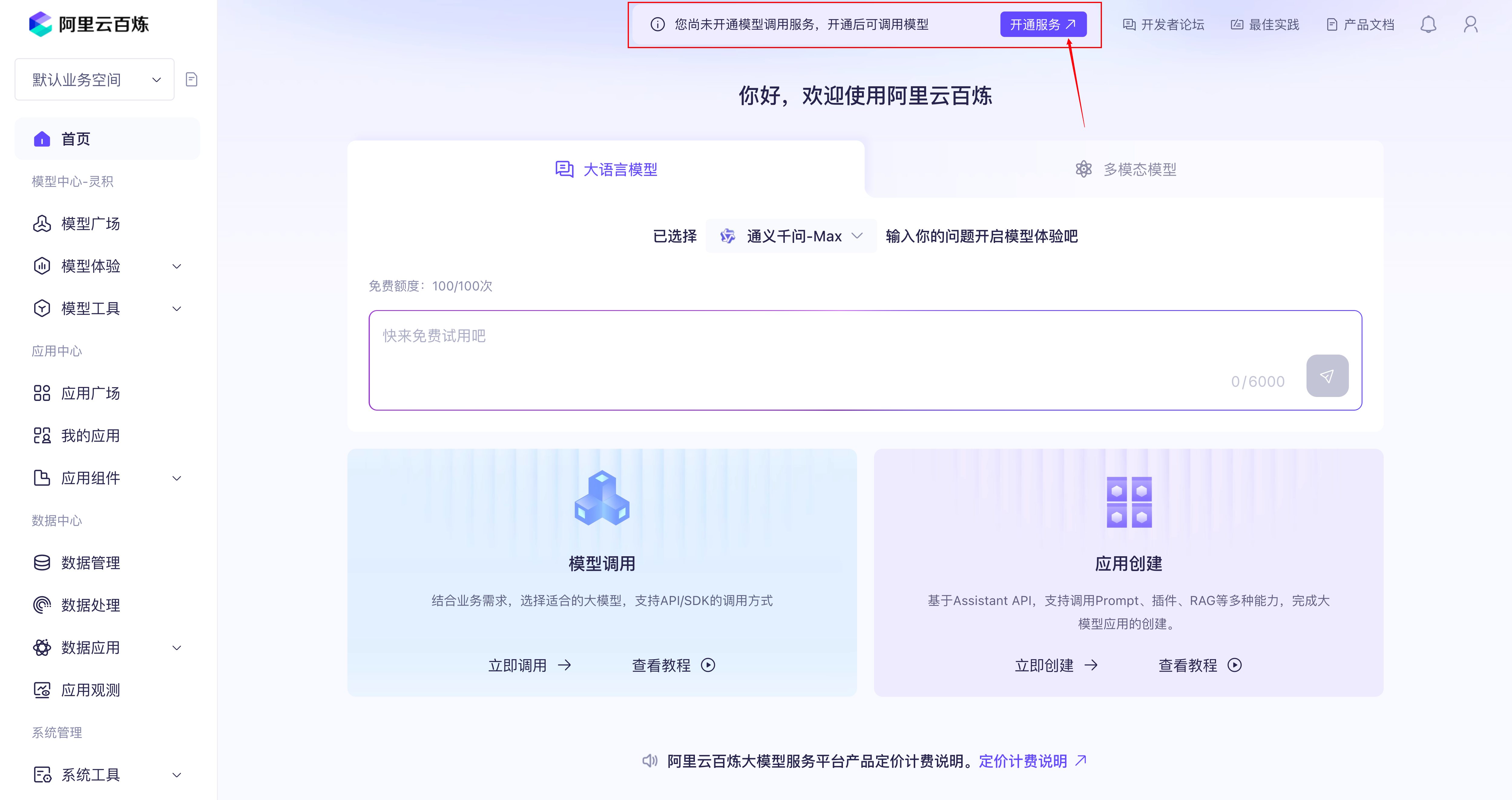
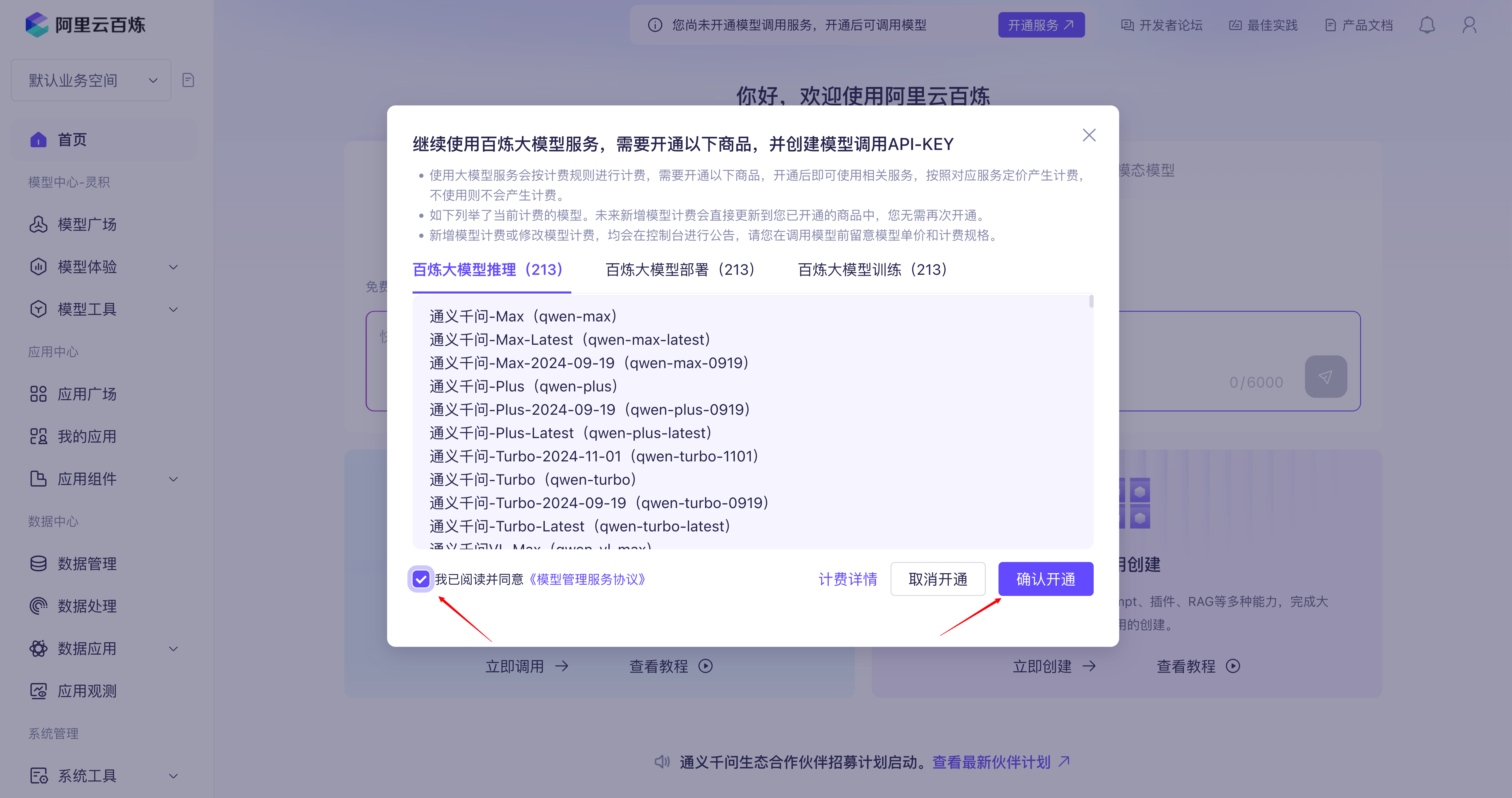
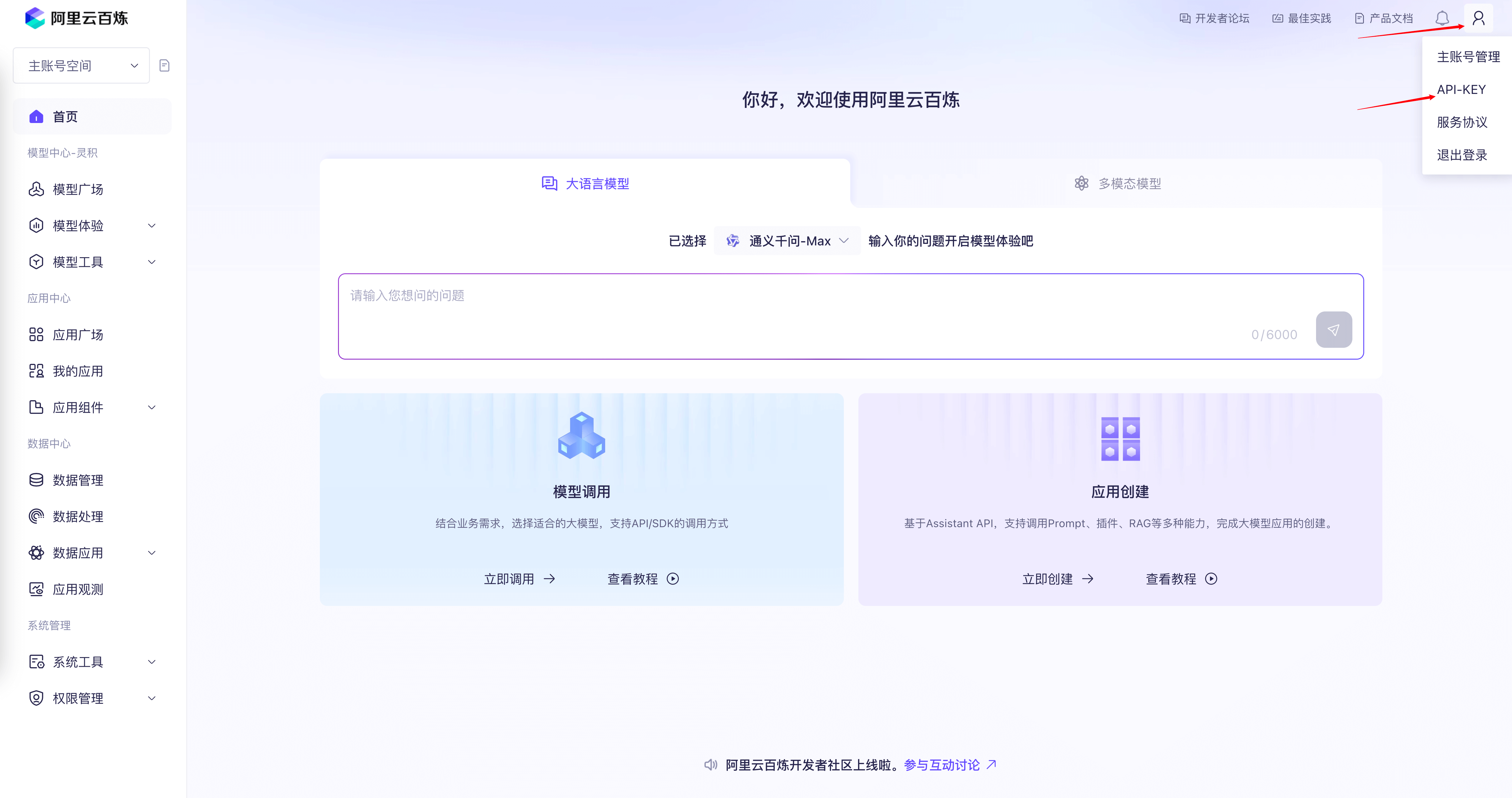
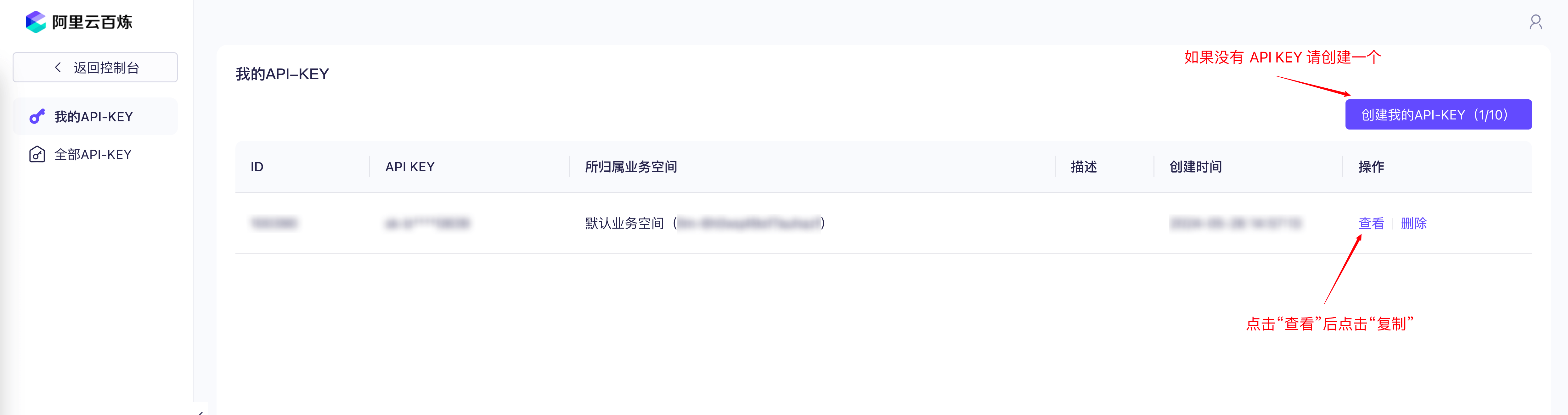
配置 API Key 到环境变量:
export DASHSCOPE_API_KEY="YOUR_DASHSCOPE_API_KEY"
步骤三:构建您的 AI 助手
下载示例数据
mkdir -p '/root/llamaindex/paul_graham/'
wget 'https://raw.githubusercontent.com/run-llama/llama_index/main/docs/docs/examples/data/paul_graham/paul_graham_essay.txt' -O '/root/llamaindex/paul_graham/paul_graham_essay.txt'
加载数据文本
import os
from pyobvector import ObVecClient
from llama_index.core import Settings
from llama_index.embeddings.dashscope import DashScopeEmbedding
from llama_index.core import (
SimpleDirectoryReader,
load_index_from_storage,
VectorStoreIndex,
StorageContext,
)
from llama_index.vector_stores.oceanbase import OceanBaseVectorStore
from llama_index.llms.dashscope import DashScope, DashScopeGenerationModels
#set ob client
client = ObVecClient(uri="127.0.0.1:2881", user="root@test",password="",db_name="test")
# Global Settings
Settings.embed_model = DashScopeEmbedding()
# config llm model
dashscope_llm = DashScope(
    model_name=DashScopeGenerationModels.QWEN_MAX,
    api_key=os.environ.get("DASHSCOPE_API_KEY", ""),
)
# load documents
documents = SimpleDirectoryReader("/root/llamaindex/paul_graham/").load_data()
oceanbase = OceanBaseVectorStore(
    client=client,
    dim=1536,
    drop_old=True,
    normalize=True,
)

storage_context = StorageContext.from_defaults(vector_store=oceanbase)
index = VectorStoreIndex.from_documents(
    documents, storage_context=storage_context
)
向量搜索
此步骤演示如何从文档 paul_graham_essay.txt 中查询 “What did the author do growing up?” 。
# set Logging to DEBUG for more detailed outputs
query_engine = index.as_query_engine(llm=dashscope_llm)
res = query_engine.query("What did the author do growing up?")
res.response
预期输出如下:
'Growing up, the author worked on writing and programming outside of school. In terms of writing, he wrote short stories, which he now considers to be awful, as they had very little plot and focused mainly on characters with strong feelings. For programming, he started in 9th grade by trying to write programs on an IBM 1401 at his school, using an early version of Fortran. Later, after getting a TRS-80 microcomputer, he began to write more practical programs, including simple games, a program to predict the flight height of model rockets, and a word processor that his father used for writing.'


