
基于湖库一体架构,统一管理结构化、半结构化与非结构化等多模态数据,一个系统承载事务处理、实时分析与 AI 工作负载。


体验 Operational OLAP
更新时间:2026-04-10 11:58:00
编辑
分享
OceanBase 数据库可以处理混合负载类型的场景。由于 OceanBase 数据库是基于对等节点的分布式架构,使得它既可以承载高并发和可扩展的 OLTP 任务,还可以在同一套数据引擎中基于 MPP 架构进行 OLAP 的并行计算,无需维护两套数据。
在 OceanBase 数据库中,您不但可以在大量在线业务数据上直接进行并行分析,还可以通过 PDML 能力(Parallel DML)将批量写入数据的大事务以并发的方式快速安全的执行。并且,这一切都是在严格保证事务一致性的前提下做到的。
下面让我们手动进行 TPC-H 测试,演示 OceanBase 数据库在 Operational OLAP 场景的特点和用法。TPC-H 是一个业界常用的基于决策支持业务的 Benchmark,通过一系列在大量数据集上面执行的复杂查询请求,检验数据库系统的分析以及决策支持能力。详细信息,可参见 TPC 组织官方网站。(2021 年 5 月 20 日,OceanBase 数据库以 1526 万 QphH 的成绩刷新了 TPC-H 世界纪录,并且是唯一一个同时刷新了TPC-C 以及 TPC-H 纪录的数据库,证明了其能够同时处理在线交易和实时分析两类业务场景能力。详细信息请参见 TPC-H Result )
手动进行 TPC-H 测试
以下内容为基于 TPC 官方 TPC-H 工具进行手动 Step-by-Step 进行 TPC-H 测试。手动测试可以帮助更好的学习和了解 OceanBase 数据库,尤其是一些参数的设置。
进行环境调优
OceanBase 数据库调优。
请在系统租户(
sys租户)下执行以下语句配置相关参数。# 调整 sys 租户占用的内存,以提供测试租户更多资源,需根据实际环境动态调整 ALTER SYSTEM SET system_memory='15g'; ALTER RESOURCE UNIT sys_unit_config memory_size ='15G'; # 调优参数 ALTER SYSTEM SET trace_log_slow_query_watermark='7d'; ALTER SYSTEM SET enable_sql_operator_dump=True; ALTER SYSTEM SET _hash_area_size='3g'; ALTER SYSTEM SET memstore_limit_percentage=50; ALTER SYSTEM SET enable_rebalance=False; ALTER SYSTEM SET memory_chunk_cache_size='0'; ALTER SYSTEM SET major_compact_trigger=5; ALTER SYSTEM SET cache_wash_threshold='30g'; # 调整日志级别及保存个数 ALTER SYSTEM SET syslog_level='ERROR'; ALTER SYSTEM SET max_syslog_file_count=100; ALTER SYSTEM SET enable_syslog_recycle='True';设置租户配置。
请在测试租户(用户租户)下执行以下语句配置相关参数。
# 设置全局参数 SET GLOBAL ob_sql_work_area_percentage=80; SET GLOBAL optimizer_use_sql_plan_baselines = true; SET GLOBAL optimizer_capture_sql_plan_baselines = true; ALTER SYSTEM SET ob_enable_batched_multi_statement='true'; # 租户下设置,防止事务超时 SET GLOBAL ob_query_timeout=36000000000; SET GLOBAL ob_trx_timeout=36000000000; SET GLOBAL max_allowed_packet=67108864; SET GLOBAL secure_file_priv=""; /* parallel_server_target 推荐设置为测试租户分配的 Resource Unit CPU 数的 10 倍 * 机器数 * 0.8 如测试租户使用的 Unit 配置为:`CREATE RESOURCE UNIT $unit_name max_cpu 26;` 那么该值为 26*10*3*0.8=624 */ SET GLOBAL parallel_servers_target=624;调优参数设置完毕后请重启集群。
安装 TPC-H Tool
下载 TPC-H Tool。详细信息请参考 TPC-H Tool 下载页面。
下载完成后解压文件,进入 TPC-H 解压后的目录。
[wieck@localhost ~] $ unzip 7e965ead-8844-4efa-a275-34e35f8ab89b-tpc-h-tool.zip [wieck@localhost ~] $ cd TPC-H_Tools_v3.0.0复制
Makefile.suite。[wieck@localhost TPC-H_Tools_v3.0.0] $ cd dbgen/ [wieck@localhost dbgen] $ cp Makefile.suite Makefile修改
Makefile文件中的 CC、DATABASE、MACHINE、WORKLOAD 等参数定义。CC = gcc # Current values for DATABASE are: INFORMIX, DB2, TDAT (Teradata) # SQLSERVER, SYBASE, ORACLE, VECTORWISE # Current values for MACHINE are: ATT, DOS, HP, IBM, ICL, MVS, # SGI, SUN, U2200, VMS, LINUX, WIN32 # Current values for WORKLOAD are: TPCH DATABASE= MYSQL MACHINE = LINUX WORKLOAD = TPCH修改
tpcd.h文件,并添加新的宏定义。#ifdef MYSQL #define GEN_QUERY_PLAN "" #define START_TRAN "START TRANSACTION" #define END_TRAN "COMMIT" #define SET_OUTPUT "" #define SET_ROWCOUNT "limit %d;\n" #define SET_DBASE "use %s;\n" #endif
6.编译文件。
make
生成数据
您可以根据实际环境生成 TPC-H 10G、100G 或者 1T 数据。本文以生成 100G 数据为例。
./dbgen -s 100
mkdir tpch100
mv *.tbl tpch100
生成查询 SQL
说明
您可参考本节中的下述步骤生成查询 SQL 后进行调整,也可直接使用 [GitHub](https://github.com/oceanbase/obdeploy/tree/master/plugins/tpch/3.1.0/queries) 中给出的查询 SQL。
若您选择使用 GitHub 中的查询 SQL,您需将 SQL 语句中的 cpu_num修改为实际并发数。
复制
qgen和dists.dss文件至queries目录。cp qgen queries cp dists.dss queries在
queries目录下创建gen.sh脚本生成查询 SQL。#!/usr/bin/bash for i in {1..22} do ./qgen -d $i -s 100 > db"$i".sql done执行
gen.sh脚本。chmod +x gen.sh ./gen.sh查询 SQL 进行调整。
dos2unix *
调整后的查询 SQL 请参考 GitHub。您需将 GitHub 给出的 SQL 语句中的 cpu_num 修改为实际并发数。建议并发数的数值与可用 CPU 总数相同,两者相等时性能最好。
您可在 sys 租户下使用如下命令查看租户的可用 CPU 总数。
select sum(max_cpu) from DBA_OB_UNITS ;
以 q1 为例,修改后的 SQL 语句如下:
select /*+ parallel(96) */ ---增加 parallel 并发执行
l_returnflag,
l_linestatus,
sum(l_quantity) as sum_qty,
sum(l_extendedprice) as sum_base_price,
sum(l_extendedprice * (1 - l_discount)) as sum_disc_price,
sum(l_extendedprice * (1 - l_discount) * (1 + l_tax)) as sum_charge,
avg(l_quantity) as avg_qty,
avg(l_extendedprice) as avg_price,
avg(l_discount) as avg_disc,
count(*) as count_order
from
lineitem
where
l_shipdate <= date '1998-12-01' - interval '90' day
group by
l_returnflag,
l_linestatus
order by
l_returnflag,
l_linestatus;
新建表
创建表结构文件 create_tpch_mysql_table_part.ddl。
create tablegroup if not exists tpch_tg_100g_lineitem_order_group binding true partition by key 1 partitions 192;
create tablegroup if not exists tpch_tg_100g_partsupp_part binding true partition by key 1 partitions 192;
drop database if exists $db_name;
create database $db_name;
use $db_name;
create table lineitem (
l_orderkey bigint not null,
l_partkey bigint not null,
l_suppkey bigint not null,
l_linenumber bigint not null,
l_quantity bigint not null,
l_extendedprice bigint not null,
l_discount bigint not null,
l_tax bigint not null,
l_returnflag char(1) default null,
l_linestatus char(1) default null,
l_shipdate date not null,
l_commitdate date default null,
l_receiptdate date default null,
l_shipinstruct char(25) default null,
l_shipmode char(10) default null,
l_comment varchar(44) default null,
primary key(l_orderkey, l_linenumber))
tablegroup = tpch_tg_100g_lineitem_order_group
partition by key (l_orderkey) partitions 192;
create index I_L_ORDERKEY on lineitem(l_orderkey) local;
create index I_L_SHIPDATE on lineitem(l_shipdate) local;
create table orders (
o_orderkey bigint not null,
o_custkey bigint not null,
o_orderstatus char(1) default null,
o_totalprice bigint default null,
o_orderdate date not null,
o_orderpriority char(15) default null,
o_clerk char(15) default null,
o_shippriority bigint default null,
o_comment varchar(79) default null,
primary key (o_orderkey))
tablegroup = tpch_tg_100g_lineitem_order_group
partition by key(o_orderkey) partitions 192;
create index I_O_ORDERDATE on orders(o_orderdate) local;
create table partsupp (
ps_partkey bigint not null,
ps_suppkey bigint not null,
ps_availqty bigint default null,
ps_supplycost bigint default null,
ps_comment varchar(199) default null,
primary key (ps_partkey, ps_suppkey))
tablegroup tpch_tg_100g_partsupp_part
partition by key(ps_partkey) partitions 192;
create table part (
p_partkey bigint not null,
p_name varchar(55) default null,
p_mfgr char(25) default null,
p_brand char(10) default null,
p_type varchar(25) default null,
p_size bigint default null,
p_container char(10) default null,
p_retailprice bigint default null,
p_comment varchar(23) default null,
primary key (p_partkey))
tablegroup tpch_tg_100g_partsupp_part
partition by key(p_partkey) partitions 192;
create table customer (
c_custkey bigint not null,
c_name varchar(25) default null,
c_address varchar(40) default null,
c_nationkey bigint default null,
c_phone char(15) default null,
c_acctbal bigint default null,
c_mktsegment char(10) default null,
c_comment varchar(117) default null,
primary key (c_custkey))
partition by key(c_custkey) partitions 192;
create table supplier (
s_suppkey bigint not null,
s_name char(25) default null,
s_address varchar(40) default null,
s_nationkey bigint default null,
s_phone char(15) default null,
s_acctbal bigint default null,
s_comment varchar(101) default null,
primary key (s_suppkey)
) partition by key(s_suppkey) partitions 192;
create table nation (
n_nationkey bigint not null,
n_name char(25) default null,
n_regionkey bigint default null,
n_comment varchar(152) default null,
primary key (n_nationkey));
create table region (
r_regionkey bigint not null,
r_name char(25) default null,
r_comment varchar(152) default null,
primary key (r_regionkey));
加载数据
您可以根据上述步骤生成的数据和 SQL 自行编写脚本。加载数据示例操作如下:
创建加载脚本目录。
mkdir load cd load cp ../dss.ri ../dss.ddl ./创建
load.py脚本。$cat load.py #/usr/bin/evn python #-*- encoding:utf-8 -*- import os import sys import time import commands hostname='$host_ip' # 注意!!请填写某个 observer,如 observer A 所在服务器的 IP 地址 port='$host_port' # observer A 的端口号 tenant='$tenant_name' # 租户名 user='$user' # 用户名 password='******' # 密码 data_path='$path' # 注意!!请填写 observer A 所在服务器下 tbl 所在目录 db_name='$db_name' # 数据库名 # 创建表 cmd_str='obclient -h%s -P%s -u%s@%s -p%s -D%s < create_tpch_mysql_table_part.ddl'%(hostname,port,user,tenant,password,db_name) result = commands.getstatusoutput(cmd_str) print result cmd_str='obclient -h%s -P%s -u%s@%s -p%s -D%s -e "show tables;" '%(hostname,port,user,tenant,password,db_name) result = commands.getstatusoutput(cmd_str) print result cmd_str=""" obclient -h%s -P%s -u%s@%s -p%s -c -D%s -e "load data /*+ parallel(80) */ infile '%s/customer.tbl' into table customer fields terminated by '|';" """ %(hostname,port,user,tenant,password,db_name,data_path) result = commands.getstatusoutput(cmd_str) print result cmd_str=""" obclient -h%s -P%s -u%s@%s -p%s -c -D%s -e "load data /*+ parallel(80) */ infile '%s/lineitem.tbl' into table lineitem fields terminated by '|';" """ %(hostname,port,user,tenant,password,db_name,data_path) result = commands.getstatusoutput(cmd_str) print result cmd_str=""" obclient -h%s -P%s -u%s@%s -p%s -c -D%s -e "load data /*+ parallel(80) */ infile '%s/nation.tbl' into table nation fields terminated by '|';" """ %(hostname,port,user,tenant,password,db_name,data_path) result = commands.getstatusoutput(cmd_str) print result cmd_str=""" obclient -h%s -P%s -u%s@%s -p%s -c -D%s -e "load data /*+ parallel(80) */ infile '%s/orders.tbl' into table orders fields terminated by '|';" """ %(hostname,port,user,tenant,password,db_name,data_path) result = commands.getstatusoutput(cmd_str) print result cmd_str=""" obclient -h%s -P%s -u%s@%s -p%s -D%s -e "load data /*+ parallel(80) */ infile '%s/partsupp.tbl' into table partsupp fields terminated by '|';" """ %(hostname,port,user,tenant,password,db_name,data_path) result = commands.getstatusoutput(cmd_str) print result cmd_str=""" obclient -h%s -P%s -u%s@%s -p%s -c -D%s -e "load data /*+ parallel(80) */ infile '%s/part.tbl' into table part fields terminated by '|';" """ %(hostname,port,user,tenant,password,db_name,data_path) result = commands.getstatusoutput(cmd_str) print result cmd_str=""" obclient -h%s -P%s -u%s@%s -p%s -c -D%s -e "load data /*+ parallel(80) */ infile '%s/region.tbl' into table region fields terminated by '|';" """ %(hostname,port,user,tenant,password,db_name,data_path) result = commands.getstatusoutput(cmd_str) print result cmd_str=""" obclient -h%s -P%s -u%s@%s -p%s -c -D%s -e "load data /*+ parallel(80) */ infile '%s/supplier.tbl' into table supplier fields terminated by '|';" """ %(hostname,port,user,tenant,password,db_name,data_path) result = commands.getstatusoutput(cmd_str) print result加载数据。
注意
加载数据需要安装 OBClient 客户端。
$ python load.py (0,'') (0, 'obclient: [Warning] Using a password on the command line interface can be insecure.\nTABLE_NAME\nT1\nLINEITEM\nORDERS\nPARTSUPP\nPART\nCUSTOMER\nSUPPLIER\nNATION\nREGION') (0, 'obclient: [Warning] Using a password on the command line interface can be insecure.') (0, 'obclient: [Warning] Using a password on the command line interface can be insecure.') (0, 'obclient: [Warning] Using a password on the command line interface can be insecure.') (0, 'obclient: [Warning] Using a password on the command line interface can be insecure.') (0, 'obclient: [Warning] Using a password on the command line interface can be insecure.') (0, 'obclient: [Warning] Using a password on the command line interface can be insecure.') (0, 'obclient: [Warning] Using a password on the command line interface can be insecure.')执行合并。
Major 合并将当前大版本的 SSTable 和 MemTable 与前一个大版本的全量静态数据进行合并,使存储层统计信息更准确,生成的执行计划更稳定。
注意
执行合并需要使用
root用户登录 OceanBase 集群的 sys 租户。MySQL [(none)]> USE oceanbase Database changed MySQL [oceanbase]> ALTER SYSTEM MAJOR FREEZE; Query OK, 0 rows affected查看合并是否完成。
MySQL [oceanbase]> SELECT FROZEN_SCN, LAST_SCN FROM oceanbase.CDB_OB_MAJOR_COMPACTION; +---------------------+---------------------+ | FROZEN_SCN | LAST_SCN | +---------------------+---------------------+ | 1667239201167716767 | 1667239201167716767 | | 1667239200111919300 | 1667239200111919300 | | 1667239201167452168 | 1667239201167452168 | | 1667239201168053124 | 1667239201168053124 | | 1667239201167520213 | 1667239201167520213 | +---------------------+---------------------+说明
所有的
FROZEN_SCN和LAST_SCN的值相等即表示合并完成。
执行测试
您可以根据上述步骤生成的数据和 SQL 自行编写脚本。执行测试示例操作如下:
在
queries目录下编写测试脚本tpch.sh。#!/bin/bash TPCH_TEST="obclient -h $host_ip -P $host_port -utpch_100g_part@tpch_mysql -D tpch_100g_part -ptest -c" # warmup预热 for i in {1..22} do sql1="source db${i}.sql" echo $sql1| $TPCH_TEST >db${i}.log || ret=1 done # 正式执行 for i in {1..22} do starttime=`date +%s%N` echo `date '+[%Y-%m-%d %H:%M:%S]'` "BEGIN Q${i}" sql1="source db${i}.sql" echo $sql1| $TPCH_TEST >db${i}.log || ret=1 stoptime=`date +%s%N` costtime=`echo $stoptime $starttime | awk '{printf "%0.2f\n", ($1 - $2) / 1000000000}'` echo `date '+[%Y-%m-%d %H:%M:%S]'` "END,COST ${costtime}s" done执行测试脚本。
sh tpch.sh
FAQ
导入数据失败。报错信息如下:
ERROR 1017 (HY000) at line 1: File not existtbl文件必须放在所连接的 OceanBase 数据库所在机器的某个目录下,因为加载数据必须本地导入。查看数据报错。报错信息如下:
ERROR 4624 (HY000):No memory or reach tenant memory limit内存不足,建议增大租户内存。
导入数据报错。报错信息如下:
ERROR 1227 (42501) at line 1: Access denied需要授予用户访问权限。运行以下命令,授予权限:
grant file on *.* to tpch_100g_part;查询 SQL 进行调整 dos2unix * 时报错,报错信息如下:
-bash: dos2unix: command not found需要安装 dos2unix。执行以下命令,即可安装:
yum install -y dos2unix
手动体验 Operational OLAP
通过上一步的操作,我们已经获得了一个 TPCH 的测试环境,下面让我们通过手动执行来看看,OceanBase 数据库在 OLAP 方面的能力和特性。 我们先使用 OBClient 登录到数据库中,如果您没有安装 OBClient,使用 mysql 客户端也是可以的。
obclient -h127.0.0.1 -P2881 -uroot@test -Dtest -A -p -c
在开始之前,您需要根据 OceanBase 集群和租户的配置,进行并行度的设置,具体大小建议不超过当前租户配置的 CPU 核数的 2 倍。例如您的租户 CPU 最大配置为8,那么此处建议并行度设置为16:
MySQL [test]> SET GLOBAL parallel_servers_target=16;
Query OK, 0 rows affected
MySQL [test]> SET GLOBAL parallel_max_servers=16;
Query OK, 0 rows affected
OceanBase 数据库兼容大多数 MySQL 的内部视图,我们可以通过如下查询查看当前环境中表的大小:
MySQL [test]> SELECT table_name, table_rows, CONCAT(ROUND(data_length/(1024*1024*1024),2),' GB') table_size FROM information_schema.TABLES WHERE table_schema = 'test' order by table_rows desc;
+------------+------------+------------+
| table_name | table_rows | table_size |
+------------+------------+------------+
| lineitem | 6001215 | 0.37 GB |
| orders | 1500000 | 0.08 GB |
| partsupp | 800000 | 0.04 GB |
| part | 200000 | 0.01 GB |
| customer | 150000 | 0.01 GB |
| supplier | 10000 | 0.00 GB |
| nation | 25 | 0.00 GB |
| region | 5 | 0.00 GB |
+------------+------------+------------+
8 rows in set
下面我们通过 TPC-H 测试中的 Q1 来体验 OceanBase 数据库查询能力,Q1 查询会在最大的 lineitem 表上,汇总分析指定时间内各类商品的价格、折扣、发货、数量等信息。这个查询对全表数据都会进行读取、并进行分区、排序、聚合等计算。
不开启并发查询
首先,我们在默认不开启并发的情况下执行该查询:
select
l_returnflag,
l_linestatus,
sum(l_quantity) as sum_qty,
sum(l_extendedprice) as sum_base_price,
sum(l_extendedprice * (1 - l_discount)) as sum_disc_price,
sum(l_extendedprice * (1 - l_discount) * (1 + l_tax)) as sum_charge,
avg(l_quantity) as avg_qty,
avg(l_extendedprice) as avg_price,
avg(l_discount) as avg_disc,
count(*) as count_order
from
lineitem
where
l_shipdate <= date '1998-12-01' - interval '90' day
group by
l_returnflag,
l_linestatus
order by
l_returnflag,
l_linestatus;
在本例的测试环境中,执行结果如下:
+--------------+--------------+----------+----------------+----------------+--------------+---------+------------+----------+-------------+
| l_returnflag | l_linestatus | sum_qty | sum_base_price | sum_disc_price | sum_charge | avg_qty | avg_price | avg_disc | count_order |
+--------------+--------------+----------+----------------+----------------+--------------+---------+------------+----------+-------------+
| A | F | 37734107 | 56586577106 | 56586577106 | 56586577106 | 25.5220 | 38273.1451 | 0.0000 | 1478493 |
| N | F | 991417 | 1487505208 | 1487505208 | 1487505208 | 25.5165 | 38284.4806 | 0.0000 | 38854 |
| N | O | 74476040 | 111701776272 | 111701776272 | 111701776272 | 25.5022 | 38249.1339 | 0.0000 | 2920374 |
| R | F | 37719753 | 56568064200 | 56568064200 | 56568064200 | 25.5058 | 38250.8701 | 0.0000 | 1478870 |
+--------------+--------------+----------+----------------+----------------+--------------+---------+------------+----------+-------------+
4 rows in set (6.791 sec)
开启并发查询
OceanBase 数据库的 Operational OLAP 能力基于一套数据以及执行引擎,无需进行异构的数据同步和维护。下面我们通过添加一个 parallel Hint,以并行度为8的方式再次执行这条语句:
select /*+parallel(8) */
l_returnflag,
l_linestatus,
sum(l_quantity) as sum_qty,
sum(l_extendedprice) as sum_base_price,
sum(l_extendedprice * (1 - l_discount)) as sum_disc_price,
sum(l_extendedprice * (1 - l_discount) * (1 + l_tax)) as sum_charge,
avg(l_quantity) as avg_qty,
avg(l_extendedprice) as avg_price,
avg(l_discount) as avg_disc,
count(*) as count_order
from
lineitem
where
l_shipdate <= date '1998-12-01' - interval '90' day
group by
l_returnflag,
l_linestatus
order by
l_returnflag,
l_linestatus;
在相同的环境和数据集中,执行结果如下:
+--------------+--------------+----------+----------------+----------------+--------------+---------+------------+----------+-------------+
| l_returnflag | l_linestatus | sum_qty | sum_base_price | sum_disc_price | sum_charge | avg_qty | avg_price | avg_disc | count_order |
+--------------+--------------+----------+----------------+----------------+--------------+---------+------------+----------+-------------+
| A | F | 37734107 | 56586577106 | 56586577106 | 56586577106 | 25.5220 | 38273.1451 | 0.0000 | 1478493 |
| N | F | 991417 | 1487505208 | 1487505208 | 1487505208 | 25.5165 | 38284.4806 | 0.0000 | 38854 |
| N | O | 74476040 | 111701776272 | 111701776272 | 111701776272 | 25.5022 | 38249.1339 | 0.0000 | 2920374 |
| R | F | 37719753 | 56568064200 | 56568064200 | 56568064200 | 25.5058 | 38250.8701 | 0.0000 | 1478870 |
+--------------+--------------+----------+----------------+----------------+--------------+---------+------------+----------+-------------+
4 rows in set (1.197 sec)
可以看到,对比默认无并发的执行耗时,并行查询下速度提升了将近 6 倍。如果我们通过 EXPLAIN 命令查看执行计划,也可以看到并行度的展示(第 18 行,1 号算子,dop=8):
===============================================================
|ID|OPERATOR |NAME |EST. ROWS|COST |
---------------------------------------------------------------
|0 |PX COORDINATOR MERGE SORT | |6 |13507125|
|1 | EXCHANGE OUT DISTR |:EX10001|6 |13507124|
|2 | SORT | |6 |13507124|
|3 | HASH GROUP BY | |6 |13507107|
|4 | EXCHANGE IN DISTR | |6 |8379337 |
|5 | EXCHANGE OUT DISTR (HASH)|:EX10000|6 |8379335 |
|6 | HASH GROUP BY | |6 |8379335 |
|7 | PX BLOCK ITERATOR | |5939712 |3251565 |
|8 | TABLE SCAN |lineitem|5939712 |3251565 |
===============================================================
Outputs & filters:
-------------------------------------
0 - output([lineitem.l_returnflag], [lineitem.l_linestatus], [T_FUN_SUM(T_FUN_SUM(lineitem.l_quantity))], [T_FUN_SUM(T_FUN_SUM(lineitem.l_extendedprice))], [T_FUN_SUM(T_FUN_SUM(lineitem.l_extendedprice * 1 - lineitem.l_discount))], [T_FUN_SUM(T_FUN_SUM(lineitem.l_extendedprice * 1 - lineitem.l_discount * 1 + lineitem.l_tax))], [T_FUN_SUM(T_FUN_SUM(lineitem.l_quantity)) / cast(T_FUN_COUNT_SUM(T_FUN_COUNT(lineitem.l_quantity)), DECIMAL(20, 0))], [T_FUN_SUM(T_FUN_SUM(lineitem.l_extendedprice)) / cast(T_FUN_COUNT_SUM(T_FUN_COUNT(lineitem.l_extendedprice)), DECIMAL(20, 0))], [T_FUN_SUM(T_FUN_SUM(lineitem.l_discount)) / cast(T_FUN_COUNT_SUM(T_FUN_COUNT(lineitem.l_discount)), DECIMAL(20, 0))], [T_FUN_COUNT_SUM(T_FUN_COUNT(*))]), filter(nil), sort_keys([lineitem.l_returnflag, ASC], [lineitem.l_linestatus, ASC])
1 - output([lineitem.l_returnflag], [lineitem.l_linestatus], [T_FUN_SUM(T_FUN_SUM(lineitem.l_quantity))], [T_FUN_SUM(T_FUN_SUM(lineitem.l_extendedprice))], [T_FUN_SUM(T_FUN_SUM(lineitem.l_extendedprice * 1 - lineitem.l_discount))], [T_FUN_SUM(T_FUN_SUM(lineitem.l_extendedprice * 1 - lineitem.l_discount * 1 + lineitem.l_tax))], [T_FUN_COUNT_SUM(T_FUN_COUNT(*))], [T_FUN_SUM(T_FUN_SUM(lineitem.l_quantity)) / cast(T_FUN_COUNT_SUM(T_FUN_COUNT(lineitem.l_quantity)), DECIMAL(20, 0))], [T_FUN_SUM(T_FUN_SUM(lineitem.l_extendedprice)) / cast(T_FUN_COUNT_SUM(T_FUN_COUNT(lineitem.l_extendedprice)), DECIMAL(20, 0))], [T_FUN_SUM(T_FUN_SUM(lineitem.l_discount)) / cast(T_FUN_COUNT_SUM(T_FUN_COUNT(lineitem.l_discount)), DECIMAL(20, 0))]), filter(nil), dop=8
2 - output([lineitem.l_returnflag], [lineitem.l_linestatus], [T_FUN_SUM(T_FUN_SUM(lineitem.l_quantity))], [T_FUN_SUM(T_FUN_SUM(lineitem.l_extendedprice))], [T_FUN_SUM(T_FUN_SUM(lineitem.l_extendedprice * 1 - lineitem.l_discount))], [T_FUN_SUM(T_FUN_SUM(lineitem.l_extendedprice * 1 - lineitem.l_discount * 1 + lineitem.l_tax))], [T_FUN_COUNT_SUM(T_FUN_COUNT(*))], [T_FUN_SUM(T_FUN_SUM(lineitem.l_quantity)) / cast(T_FUN_COUNT_SUM(T_FUN_COUNT(lineitem.l_quantity)), DECIMAL(20, 0))], [T_FUN_SUM(T_FUN_SUM(lineitem.l_extendedprice)) / cast(T_FUN_COUNT_SUM(T_FUN_COUNT(lineitem.l_extendedprice)), DECIMAL(20, 0))], [T_FUN_SUM(T_FUN_SUM(lineitem.l_discount)) / cast(T_FUN_COUNT_SUM(T_FUN_COUNT(lineitem.l_discount)), DECIMAL(20, 0))]), filter(nil), sort_keys([lineitem.l_returnflag, ASC], [lineitem.l_linestatus, ASC])
3 - output([lineitem.l_returnflag], [lineitem.l_linestatus], [T_FUN_SUM(T_FUN_SUM(lineitem.l_quantity))], [T_FUN_SUM(T_FUN_SUM(lineitem.l_extendedprice))], [T_FUN_SUM(T_FUN_SUM(lineitem.l_extendedprice * 1 - lineitem.l_discount))], [T_FUN_SUM(T_FUN_SUM(lineitem.l_extendedprice * 1 - lineitem.l_discount * 1 + lineitem.l_tax))], [T_FUN_COUNT_SUM(T_FUN_COUNT(lineitem.l_quantity))], [T_FUN_COUNT_SUM(T_FUN_COUNT(lineitem.l_extendedprice))], [T_FUN_SUM(T_FUN_SUM(lineitem.l_discount))], [T_FUN_COUNT_SUM(T_FUN_COUNT(lineitem.l_discount))], [T_FUN_COUNT_SUM(T_FUN_COUNT(*))]), filter(nil),
group([lineitem.l_returnflag], [lineitem.l_linestatus]), agg_func([T_FUN_SUM(T_FUN_SUM(lineitem.l_quantity))], [T_FUN_SUM(T_FUN_SUM(lineitem.l_extendedprice))], [T_FUN_SUM(T_FUN_SUM(lineitem.l_extendedprice * 1 - lineitem.l_discount))], [T_FUN_SUM(T_FUN_SUM(lineitem.l_extendedprice * 1 - lineitem.l_discount * 1 + lineitem.l_tax))], [T_FUN_COUNT_SUM(T_FUN_COUNT(*))], [T_FUN_COUNT_SUM(T_FUN_COUNT(lineitem.l_quantity))], [T_FUN_COUNT_SUM(T_FUN_COUNT(lineitem.l_extendedprice))], [T_FUN_SUM(T_FUN_SUM(lineitem.l_discount))], [T_FUN_COUNT_SUM(T_FUN_COUNT(lineitem.l_discount))])
4 - output([lineitem.l_returnflag], [lineitem.l_linestatus], [T_FUN_SUM(lineitem.l_quantity)], [T_FUN_SUM(lineitem.l_extendedprice)], [T_FUN_SUM(lineitem.l_extendedprice * 1 - lineitem.l_discount)], [T_FUN_SUM(lineitem.l_extendedprice * 1 - lineitem.l_discount * 1 + lineitem.l_tax)], [T_FUN_COUNT(lineitem.l_quantity)], [T_FUN_COUNT(lineitem.l_extendedprice)], [T_FUN_SUM(lineitem.l_discount)], [T_FUN_COUNT(lineitem.l_discount)], [T_FUN_COUNT(*)]), filter(nil)
5 - (#keys=2, [lineitem.l_returnflag], [lineitem.l_linestatus]), output([lineitem.l_returnflag], [lineitem.l_linestatus], [T_FUN_SUM(lineitem.l_quantity)], [T_FUN_SUM(lineitem.l_extendedprice)], [T_FUN_SUM(lineitem.l_extendedprice * 1 - lineitem.l_discount)], [T_FUN_SUM(lineitem.l_extendedprice * 1 - lineitem.l_discount * 1 + lineitem.l_tax)], [T_FUN_COUNT(lineitem.l_quantity)], [T_FUN_COUNT(lineitem.l_extendedprice)], [T_FUN_SUM(lineitem.l_discount)], [T_FUN_COUNT(lineitem.l_discount)], [T_FUN_COUNT(*)]), filter(nil), dop=8
6 - output([lineitem.l_returnflag], [lineitem.l_linestatus], [T_FUN_SUM(lineitem.l_quantity)], [T_FUN_SUM(lineitem.l_extendedprice)], [T_FUN_SUM(lineitem.l_extendedprice * 1 - lineitem.l_discount)], [T_FUN_SUM(lineitem.l_extendedprice * 1 - lineitem.l_discount * 1 + lineitem.l_tax)], [T_FUN_COUNT(lineitem.l_quantity)], [T_FUN_COUNT(lineitem.l_extendedprice)], [T_FUN_SUM(lineitem.l_discount)], [T_FUN_COUNT(lineitem.l_discount)], [T_FUN_COUNT(*)]), filter(nil),
group([lineitem.l_returnflag], [lineitem.l_linestatus]), agg_func([T_FUN_SUM(lineitem.l_quantity)], [T_FUN_SUM(lineitem.l_extendedprice)], [T_FUN_SUM(lineitem.l_extendedprice * 1 - lineitem.l_discount)], [T_FUN_SUM(lineitem.l_extendedprice * 1 - lineitem.l_discount * 1 + lineitem.l_tax)], [T_FUN_COUNT(*)], [T_FUN_COUNT(lineitem.l_quantity)], [T_FUN_COUNT(lineitem.l_extendedprice)], [T_FUN_SUM(lineitem.l_discount)], [T_FUN_COUNT(lineitem.l_discount)])
7 - output([lineitem.l_returnflag], [lineitem.l_linestatus], [lineitem.l_quantity], [lineitem.l_extendedprice], [lineitem.l_discount], [lineitem.l_extendedprice * 1 - lineitem.l_discount], [lineitem.l_extendedprice * 1 - lineitem.l_discount * 1 + lineitem.l_tax]), filter(nil)
8 - output([lineitem.l_returnflag], [lineitem.l_linestatus], [lineitem.l_quantity], [lineitem.l_extendedprice], [lineitem.l_discount], [lineitem.l_extendedprice * 1 - lineitem.l_discount], [lineitem.l_extendedprice * 1 - lineitem.l_discount * 1 + lineitem.l_tax]), filter([lineitem.l_shipdate <= ?]),
access([lineitem.l_shipdate], [lineitem.l_returnflag], [lineitem.l_linestatus], [lineitem.l_quantity], [lineitem.l_extendedprice], [lineitem.l_discount], [lineitem.l_tax]), partitions(p[0-15])
本文中的例子使用单节点环境部署,值得特别说明的是,OceanBase 数据库的并行执行框架最大的特点是还可以将大量数据的分析查询以多节点并发执行的方式进行分析。例如一张表包含上亿行数据,分布在多个 OceanBase 数据库节点上,当进行分析查询时,OceanBase 数据库的分布式执行框架可以生成一个分布式并行执行计划,利用多个节点的资源进行分析。因此具备很好的扩展性,同时针对并行的设置还可以在 SQL、会话、表上多个维度进行设置。
使用 obd 工具自动进行 TPCH 测试
功能适用性
该内容仅适用于 OceanBase 数据库社区版。OceanBase 数据库企业版暂不支持 obd 使用。
进行 TPC-H 测试除了可以参考 TPC 官方网站提供的数据集生成工具,我们也可以使用 obd 方便的进行数据集生成、建表、数据导入等工作,并且自动完成 22 个 SQL 的执行。 在使用 obd 进行 TPC-H 测试前,您需要先在部署了 OceanBase 和 obd 的节点上安装 obtpch 组件:
sudo yum install obtpch
完成后,我们通过如下命令,就可以启动一个数据集规模为 1 GB 的 TPCH 测试了,整个过程包括数据集生成、schema 导入、以及自动运行测试。本文中假设您的测试环境部署和 快速体验 OceanBase 数据库 中的步骤一致,如有差别,例如集群名称、密码 安装目录等,请根据具体情况进行调整。
注意
请确保您的磁盘空间足够放置数据集文件,以免将空间占满导致系统异常。
本例中我们使用 /tmp 目录进行测试。
cd /tmp
obd test tpch obtest --tenant=test -s 1 --password='******' --remote-tbl-dir=/tmp/tpch1
执行上述命令后,obd 开始执行,可以看到执行过程中的每个步骤:
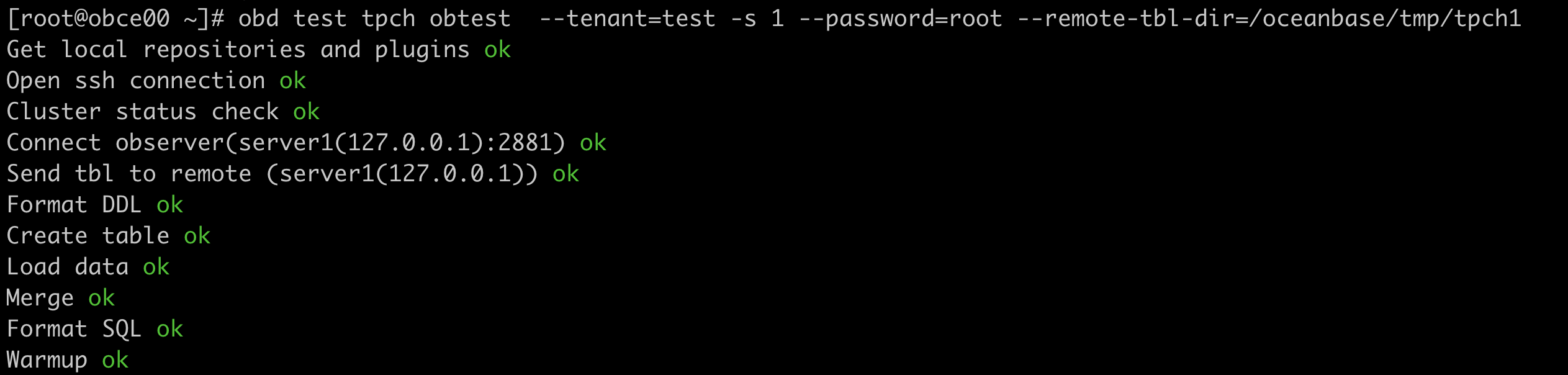

数据导入完成后,obd 自动进行 22 个 SQL 的执行,并打印每个 SQL 的耗时以及总耗时。


