
基于湖库一体架构,统一管理结构化、半结构化与非结构化等多模态数据,一个系统承载事务处理、实时分析与 AI 工作负载。


从 SQL 文件导入数据到 OceanBase 数据库
更新时间:2023-07-25 13:45:37
编辑
分享
将 SQL 格式的数据文件导入到 OceanBase 数据库,可以采用命令行界面导入和工具导入两种方式。OceanBase 数据库支持多种工具导入 SQL 格式的数据文件,如:MySQLDumper、OBLOADER 和 OceanBase 开发者工具(以下简称:ODC)等图形化界面工具。
本文将主要介绍使用命令行界面、OBLOADER 和 ODC 从 SQL 文件导入数据到 OceanBase 数据库。
配置 SQL 文件信息
导入到 OceanBase 数据库 SQL 文件中的 SQL 语法必须符合 OceanBase 数据库的要求。
有关 OceanBase 数据库 SQL 语法的详细信息,请参见 SQL 语法(MySQL 模式) 和 SQL 语法(Oracle 模式)。
示例中使用的 SQL 文件信息如下:
[xxx@xxx /home/admin/test_sql]# cat test_tbl1.sql
DROP TABLE IF EXISTS test_data.test_tbl1;

CREATE TABLE IF NOT EXISTS test_data.test_tbl1(col1 INT,col2 VARCHAR(50),PRIMARY KEY (col1));

INSERT INTO test_data.test_tbl1 VALUES(1,'test1');
INSERT INTO test_data.test_tbl1 VALUES(2,'test2');
INSERT INTO test_data.test_tbl1 VALUES(3,'test3');
INSERT INTO test_data.test_tbl1 VALUES(4,'test4');
INSERT INTO test_data.test_tbl1 VALUES(5,'test5');
使用命令行界面导入数据
使用 SQL 文件所在的机器登录 OceanBase 数据库。
[xxx@xxx /home/admin]# obclient -h10.10.10.1 -P2881 -uroot@mysql001 -p -A
Enter password:
Welcome to the OceanBase.  Commands end with ; or \g.
Your OceanBase connection id is 3221709595
Server version: OceanBase 4.0.0.0 (r100000302022111120-7cef93737c5cd03331b5f29130c6e80ac950d33b) (Built Nov 11 2022 20:38:33)

Copyright (c) 2000, 2018, OceanBase and/or its affiliates. All rights reserved.

Type 'help;' or '\h' for help. Type '\c' to clear the current input statement.

obclient [(none)]>
创建 Schema 库
test_data。obclient [(none)]> CREATE DATABASE test_data; Query OK, 1 row affected使用
SOURCE命令导入 SQL 文件数据。obclient [(none)]> SOURCE /home/admin/test_tbl1.sql Query OK, 0 rows affected, 1 warning Query OK, 0 rows affected Query OK, 1 row affected Query OK, 1 row affected Query OK, 1 row affected Query OK, 1 row affected Query OK, 1 row affected查看导入数据信息。
obclient [test_data]> use test_data;
Database changed
obclient [test_data]> SHOW TABLES;
+---------------------+
| Tables_in_test_data |
+---------------------+
| test_tbl1           |
+---------------------+
1 row in set

obclient [test_data]> SELECT * FROM test_tbl1;
+------+-------+
| col1 | col2  |
+------+-------+
|    1 | test1 |
|    2 | test2 |
|    3 | test3 |
|    4 | test4 |
|    5 | test5 |
+------+-------+
5 rows in set
使用 ODC 导入数据
ODC 对导入上传的文件,最大支持导出 2GB 的数据(压缩后),超出部分无法上传。如需导入大量数据,请使用导数工具 OBLOADER。
下面内容将介绍使用 Web 版 ODC 导入数据。
准备 ODC 环境。
ODC 分为 Web 版 和 客户端版,详细信息请参见 Web 版部署概述 和 客户端版安装 ODC。
连接 OceanBase 数据库。
连接 OceanBase 数据库的详细信息,请参见 创建个人连接。

进入导入设置面板。
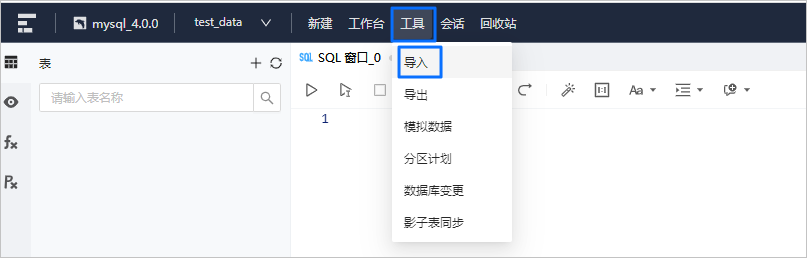
进入数据库连接后,单击顶部导航栏中的 工具 标签,在弹出的下拉菜单中单击 导入 标签进入导入设置面板。
上传 SQL 文件。
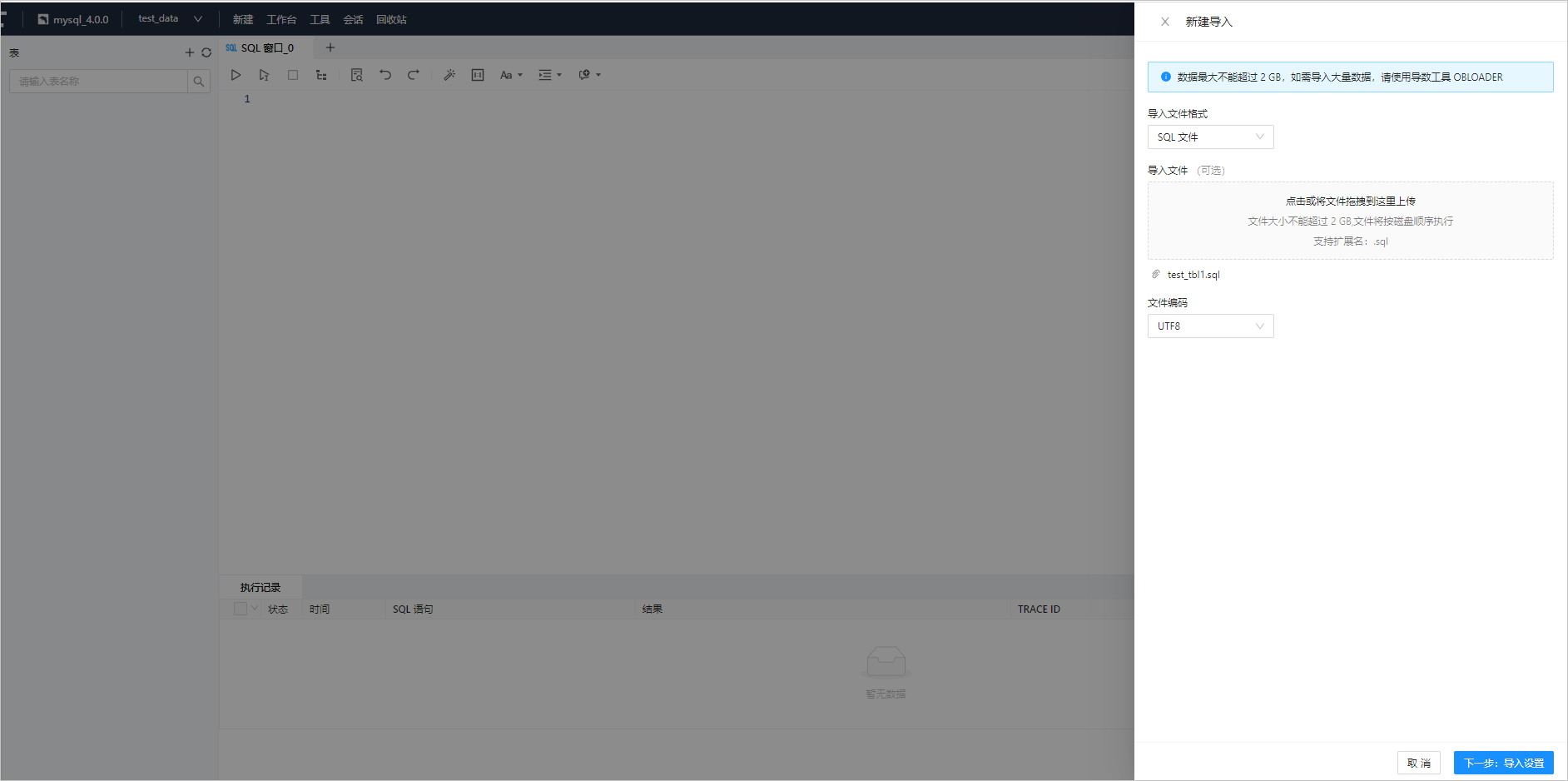
如下图所示:
- 选择 导入文件格式:选择 SQL 文件。
- 上传 导入文件:单击文件池进入文件资源管理器以选择需要导入的文件,或者直接将文件拖入文件池中以完成文件上传。上传的文件格式需要与所选择的导入文件格式相同,SQL 文件支持上传
.sql文件。 - 选择 文件编码:ODC 目前支持 ASCII、ISO-8859-1、GB2312、GBK、GB18030、Unicode(UTF-8)、Unicode(UTF-16)、Unicode(UTF-32) 和 BIG5 等编码格式。可在 文件编码 下拉框中选择需要的编码格式。
- 完成上述配置后,单击 下一步:导入设置。
导入设置。
如下图所示:
- 选择 所属库:选择导入对象所在的数据库。该项下同时显示目标任务所在数据库的连接名称。
- 任务设置,选择 执行方式:支持选择 立即执行 和 定时执行。
- sys 租户账号设置:输入账户和密码信息后,单击密码框后的 测试连接 按钮测试账户信息是否正确。默认自动填入连接设置的账号,如连接失败,建议修改密码用于此次导出。
注意
sys 租户账号和密码 为集群租户下用户的账号和密码 (账号请勿填入"@sys#集群")。

查看导入任务。
任务生成后会自动弹出 任务中心 面板,在任务中心可以查看任务信息,详情请参见 导入任务。

使用 OBLOADER 导入数据
操作步骤
设置 SQL 文件。
导入数据。
[xxx@xxx /ob-loader-dumper-3.3.2-SNAPSHOT/bin]
$./obloader -h <主机IP> -P <端⼝> -u <⽤⼾> -p <密码>  --sys-user <sys 租户下的 root 用户或 proxyro 用户> --sys-password <sys 租⼾下的账⼾密码> -c <集群> -t <租⼾> -D <Schema 库名> [--ddl] [--csv|--sql] [--all|--table '表名'] -f <数据⽂件或者⽬录>
说明
使用 OceanBase 物理节点的主机地址和端口导入数据时,无需指定 -c 选项。
有关 OBLOADER 命令行选项的详细信息,请参见 [命令行选项](https://www.oceanbase.com/docs/enterprise-oceanbase-dumper-loader-cn-10000000000971199)。
导入 SQL 文件数据示例
下表为示例中使用的数据库信息:
| 数据库信息 | 示例值 |
|---|---|
| 集群名 | test4000 |
| OceanBase DataBase Proxy (ODP) 主机地址 | 10.10.10.1 |
| OceanBase DataBase Proxy (ODP) 端口号 | 2883 |
| 业务租户名称 | mysql001 |
| sys 租户下 root 用户的密码 | ****** |
| 业务租户下的用户账号(要求读写权限) | obloader_user01 |
| 业务租户下的用户密码 | ****** |
| Schema 库名称 | test_data |
导入表结构
注意
- 导入表结构时,SQL 内容是 DDL,使用
--ddl选项。要求 SQL 里不能有注释和 SET 开关语句等。 - SQL 文件的目录要在
-f选项中的/data/TABLE下,例如:/home/admin/test_sql/data/TABLE/test_tbl1-schema.sql。 - SQL 文件的名称格式:
表名-schema.sql。 - 导入数据时,需要指定
--sys-user和--sys-password选项,OBLOADER 获取表结构元数据信息。
场景描述:将 /home/admin/test_sql/data/TABLE 下的 SQL 数据文件,导入到集群 test4000 下的租户 mysql001 里的 Schema test_data 中。
示例语句如下:
创建 SQL 文件。
[root@xxx /home/admin]# mkdir -p /home/admin/test_sql/data/TABLE [root@xxx /home/admin]# cd /home/admin/test_sql/data/TABLE [root@xxx /home/admin/test_sql/data/TABLE]# vi test_tbl1-schema.sql [root@xxx /home/admin/test_sql/data/TABLE]# cat test_tbl1-schema.sql CREATE TABLE IF NOT EXISTS test_tbl1(col1 INT,col2 VARCHAR(50),PRIMARY KEY (col1));导入表结构。
[root@xxx /home/admin/ob-loader-dumper-3.3.2-SNAPSHOT/bin]
$./obloader -h 10.10.10.1 -P 2883 -u obloader_user01 -p ****** --sys-user root --sys-password ****** -c test4000 -t mysql001 -D test_data --ddl --all -f /home/admin/test_sql
2022-12-01 07:11:32 [INFO] Parsed args:
[--host] 10.10.10.1
[--port] 2883
[--user] obloader_user01
[--tenant] mysql001
[--cluster] test4000
[--password] ******
[--database] test_data
[--sys-user] root
[--sys-password] ******
[--ddl] true
[--file-path] /home/admin/test_sql
[--all] true

2022-12-01 07:11:32 [INFO] Load jdbc driver class: "com.oceanbase.jdbc.Driver" finished
2022-12-01 07:11:33 [INFO] The manifest file: "/home/admin/test_sql/data/MANIFEST.bin" has been saved
2022-12-01 07:11:33 [INFO] Init writer thread pool finished
2022-12-01 07:11:33 [WARN] The object type : "SEQUENCE" doesn't exist in the -schema.sql files
2022-12-01 07:11:33 [WARN] The object type : "TABLE_GROUP" doesn't exist in the -schema.sql files
2022-12-01 07:11:33 [INFO] Start 128 schema file loader threads successed
2022-12-01 07:11:33 [INFO] No.1 sql of the file: "/home/admin/test_sql/data/TABLE/test_tbl1-schema.sql" exec  success . Elapsed: 36.94 ms
2022-12-01 07:11:33 [INFO] Load file: "test_tbl1-schema.sql" succeeded
2022-12-01 07:11:33 [WARN] The object type : "VIEW" doesn't exist in the -schema.sql files
2022-12-01 07:11:33 [WARN] The object type : "FUNCTION" doesn't exist in the -schema.sql files
2022-12-01 07:11:33 [WARN] The object type : "PROCEDURE" doesn't exist in the -schema.sql files
2022-12-01 07:11:33 [WARN] The object type : "TRIGGER" doesn't exist in the -schema.sql files
2022-12-01 07:11:33 [WARN] The object type : "PACKAGE" doesn't exist in the -schema.sql files
2022-12-01 07:11:33 [WARN] The object type : "TYPE" doesn't exist in the -schema.sql files
2022-12-01 07:11:33 [WARN] The object type : "PACKAGE_BODY" doesn't exist in the -schema.sql files
2022-12-01 07:11:33 [WARN] The object type : "TYPE_BODY" doesn't exist in the -schema.sql files
2022-12-01 07:11:33 [WARN] The object type : "SYNONYM" doesn't exist in the -schema.sql files
2022-12-01 07:11:33 [WARN] The object type : "PUBLIC_SYNONYM" doesn't exist in the -schema.sql files
2022-12-01 07:11:33 [WARN] The object type : "FILE" doesn't exist in the -schema.sql files
2022-12-01 07:11:34 [INFO] Close connection count: 1 of the DataSource. Key: 10.10.10.1_11532_332378361_test_data
2022-12-01 07:11:34 [INFO] Shutdown task context finished
2022-12-01 07:11:34 [INFO]
Finished Tasks: 1       Running Tasks: 0        Progress: 100.00%
2022-12-01 07:11:34 [INFO]

All Load Tasks Finished:

----------------------------------------------------------------------------------------------------------------------------
        No.#        |        Type        |             Name             |            Count             |       Status
----------------------------------------------------------------------------------------------------------------------------
        1          |       TABLE        |          test_tbl1           |            1 -> 1            |      SUCCESS
----------------------------------------------------------------------------------------------------------------------------

Total Count: 1          End Time: 2022-12-01 07:11:34


2022-12-01 07:11:34 [INFO] Load schema finished. Total Elapsed: 1.061 s
2022-12-01 07:11:34 [INFO] System exit 0
导入表数据
注意
- 导入表数据时,SQL 内容是 DML,使用
--sql选项。SQL 文件中的内容仅包含INSERT语句, 数据不换行。 - SQL 文件的目录要在
-f选项中的data下,例如:/home/admin/test_sql/data/test_tbl1.sql。 - SQL 文件的名称格式:
表名.sql。 - 数据库(Schema)下要存在 SQL 文件对应的表名。
场景描述:将 /home/admin/test_sql/data/ SQL 数据文件,导入到集群 test4000 下的租户 mysql001 里的 Schema test_data 中。
示例语句如下:
创建 SQL 文件。
[root@xxx /home/admin]# mkdir -p /home/admin/test_sql/data [root@xxx /home/admin]# cd /home/admin/test_sql/data [root@xxx /home/admin/test_sql/data]# vi test_tbl1.sql [root@xxx /home/admin/test_sql/data/TABLE]# cat test_tbl1.sql INSERT INTO test_tbl1 VALUES(1,'test1'); INSERT INTO test_tbl1 VALUES(2,'test2'); INSERT INTO test_tbl1 VALUES(3,'test3'); INSERT INTO test_tbl1 VALUES(4,'test4'); INSERT INTO test_tbl1 VALUES(5,'test5');导入表数据。
[root@xxx /home/admin/ob-loader-dumper-3.3.2-SNAPSHOT/bin]
$./obloader -h 10.10.10.1 -P 2883 -u obloader_user01 -p ****** --sys-user root --sys-password ****** -c test4000 -t mysql001 -D test_data --sql --all -f /home/admin/test_sql
2022-12-01 07:17:39 [INFO] Parsed args:
[--host] 10.10.10.1
[--port] 2883
[--user] obloader_user01
[--tenant] mysql001
[--cluster] test4000
[--password] ******
[--database] test_data
[--sys-user] root
[--sys-password] ******
[--sql] true
[--file-path] /home/admin/test_sql
[--all] true

2022-12-01 07:17:39 [INFO] Load jdbc driver class: "com.oceanbase.jdbc.Driver" finished
2022-12-01 07:17:40 [INFO] The manifest file: "/home/admin/test_sql/data/MANIFEST.bin" has been saved
2022-12-01 07:17:40 [INFO] Query the column metadata for the table: "test_tbl1" finished
2022-12-01 07:17:40 [WARN] File: "/home/admin/test_sql/data/TABLE/test_tbl1-schema.sql" is unmatched on the suffix[.sql], ignore it
2022-12-01 07:17:40 [WARN] File: "/home/admin/test_sql/data/MANIFEST.bin" is unmatched on the suffix[.sql], ignore it
2022-12-01 07:17:40 [INFO] Binding table: "test_tbl1" to the file: "/home/admin/test_sql/data/test_tbl1.sql" finished
2022-12-01 07:17:40 [INFO] File: "/home/admin/test_sql/data/test_tbl1.sql" has not been splitted. 205 < 67108864
2022-12-01 07:17:40 [INFO] Splitted 1 sql subfiles by 64.0 MB. Elapsed: 15.64 ms
2022-12-01 07:17:40 [INFO] Generate 1 subfiles finished
2022-12-01 07:17:40 [INFO] Ignore to clean any tables as --truncate-table or --delete-from-table is not specified
2022-12-01 07:17:40 [ERROR] Invalid table entry: TableEntryKey [ cluster: test4000, tenant: mysql001, database: test_data, table: test_tbl1 ], TableId: -9223372036854775808, PartitionNum: 1, ReplicaNum: -9223372036854775808, SchemaVersion: null, PartitionInfo: null
2022-12-01 07:17:40 [INFO] Query table entry and primary key for table: "test_tbl1" finished. Remain: 0
2022-12-01 07:17:40 [INFO] Calculate leader: null of table: "test_tbl1", part: 0. Remain: 0
2022-12-01 07:17:40 [INFO] Waiting to refresh observer load status ......
2022-12-01 07:17:40 [INFO] Refresh the observer load status success. Table: "test_tbl1". Remain: 0
2022-12-01 07:17:40 [INFO] Refresh observer load status finished. Elapsed: 1.203 ms
2022-12-01 07:17:40 [INFO] Use c.l.d.PhasedBackoffWaitStrategy as available cpu(s) is 64
2022-12-01 07:17:40 [INFO] Create 4096 slots for ring buffer finished. [0.0.0.0]
2022-12-01 07:17:40 [INFO] Start 128 database writer threads finished. [0.0.0.0]
2022-12-01 07:17:40 [INFO] Start 128 sql file reader threads successed
2022-12-01 07:17:40 [INFO] File: "/home/admin/test_sql/data/test_tbl1.sql" has been parsed finished
2022-12-01 07:17:42 [INFO] Wait for the all the workers to drain of published events then halt the workers
2022-12-01 07:17:42 [INFO] Close connection count: 4 of the DataSource. Key: 10.10.10.1_11532_332378361_test_data
2022-12-01 07:17:42 [INFO] Shutdown task context finished
2022-12-01 07:17:42 [INFO]
Finished Tasks: 1       Running Tasks: 0        Progress: 100.00%
2022-12-01 07:17:42 [INFO]

All Load Tasks Finished:

----------------------------------------------------------------------------------------------------------------------------
        No.#        |        Type        |             Name             |            Count             |       Status
----------------------------------------------------------------------------------------------------------------------------
        1          |       TABLE        |          test_tbl1           |            5 -> 5            |      SUCCESS
----------------------------------------------------------------------------------------------------------------------------

Total Count: 5          End Time: 2022-12-01 07:17:42


2022-12-01 07:17:42 [INFO] Load record finished. Total Elapsed: 2.296 s
2022-12-01 07:17:42 [INFO] System exit 0


