
基于湖库一体架构,统一管理结构化、半结构化与非结构化等多模态数据,一个系统承载事务处理、实时分析与 AI 工作负载。


使用 Flink CDC 从 MySQL 数据库同步数据到 OceanBase 数据库
更新时间:2026-05-20 14:02:53
编辑
分享
Flink CDC (CDC Connectors for Apache Flink) 是 Apache Flink 的一组 Source 连接器,它支持从大多数据库中实时地读取存量历史数据和增量变更数据。Flink CDC 能够将数据库的全量和增量数据同步到消息队列和数据仓库中。Flink CDC 也可以用于实时数据集成,您可以使用它将数据库数据实时导入数据湖或者数据仓库。同时,Flink CDC 还支持数据加工,您可以通过它的 SQL Client 对数据库数据做实时关联、打宽、聚合,并将结果写入到各种存储中。CDC (Change Data Capture,即变更数据捕获)能够帮助您监测并捕获数据库的变动。CDC 提供的数据可以做很多事情,比如:做历史库、做近实时缓存、提供给消息队列(MQ),用户消费 MQ 做分析和审计等。
以下将介绍使用 Flink CDC 从 MySQL 数据库同步数据到 OceanBase 数据库。
Flink CDC 环境准备
下载 Flink 和所需要的依赖包:
通过 下载地址 下载 Flink。本文档使用的是 Flink 1.15.3,并将其解压至目录
/FLINK_HOME/flink-1.15.3。下载下面列出的依赖包,并将它们放到目录
/FLINK_HOME/flink-1.15.3/lib/下。
准备数据
准备 MySQL 数据库数据
在 MySQL 数据库中准备测试数据,作为导入 OceanBase 数据库的源数据。
进入 MySQL 数据库。
[xxx@xxx /...] $mysql -hxxx.xxx.xxx.xxx -P3306 -uroot -p****** <Omit echo information> MySQL [(none)]>创建数据库
test_mysql_to_ob,表tbl1和tbl2,并插入数据。MySQL [(none)]> CREATE DATABASE test_mysql_to_ob; Query OK, 1 row affected MySQL [(none)]> USE test_mysql_to_ob; Database changed MySQL [test_mysql_to_ob]> CREATE TABLE tbl1(col1 INT PRIMARY KEY, col2 VARCHAR(20),col3 INT); Query OK, 0 rows affected MySQL [test_mysql_to_ob]> INSERT INTO tbl1 VALUES(1,'China',86),(2,'Taiwan',886),(3,'Hong Kong',852),(4,'Macao',853),(5,'North Korea',850); Query OK, 5 rows affected Records: 5 Duplicates: 0 Warnings: 0 MySQL [test_mysql_to_ob]> CREATE TABLE tbl2(col1 INT PRIMARY KEY,col2 VARCHAR(20)); Query OK, 0 rows affected MySQL [test_mysql_to_ob]> INSERT INTO tbl2 VALUES(86,'+86'),(886,'+886'),(852,'+852'),(853,'+853'),(850,'+850'); Query OK, 5 rows affected Records: 5 Duplicates: 0 Warnings: 0
准备 OceanBase 数据库数据
在 OceanBase 数据库中创建存放源数据的表。
登录 OceanBase 数据库。
使用
user001用户登录集群的mysql001租户。[xxx@xxx /...] $obclient -h10.10.10.2 -P2881 -uuser001@mysql001 -p -A Enter password: Welcome to the OceanBase. Commands end with ; or \g. Your OceanBase connection id is 3221536981 Server version: OceanBase 4.0.0.0 (r100000302022111120-7cef93737c5cd03331b5f29130c6e80ac950d33b) (Built Nov 11 2022 20:38:33) Copyright (c) 2000, 2018, OceanBase and/or its affiliates. All rights reserved. Type 'help;' or '\h' for help. Type '\c' to clear the current input statement. obclient [(none)]>创建数据库
test_mysql_to_ob和表mysql_tbl1_and_tbl2。obclient [(none)]> CREATE DATABASE test_mysql_to_ob; Query OK, 1 row affected obclient [(none)]> USE test_mysql_to_ob; Database changed obclient [test_mysql_to_ob]> CREATE TABLE mysql_tbl1_and_tbl2(col1 INT PRIMARY KEY,col2 INT,col3 VARCHAR(20),col4 VARCHAR(20)); Query OK, 0 rows affected
启动 Flink 集群和 Flink SQL CLI
使用下面的命令跳转至 Flink 目录下。
[xxx@xxx /FLINK_HOME] #cd flink-1.15.3使用下面的命令启动 Flink 集群。
[xxx@xxx /FLINK_HOME/flink-1.15.3] #./bin/start-cluster.sh启动成功的话,可以在
http://localhost:8081/访问到 Flink Web UI,如下所示: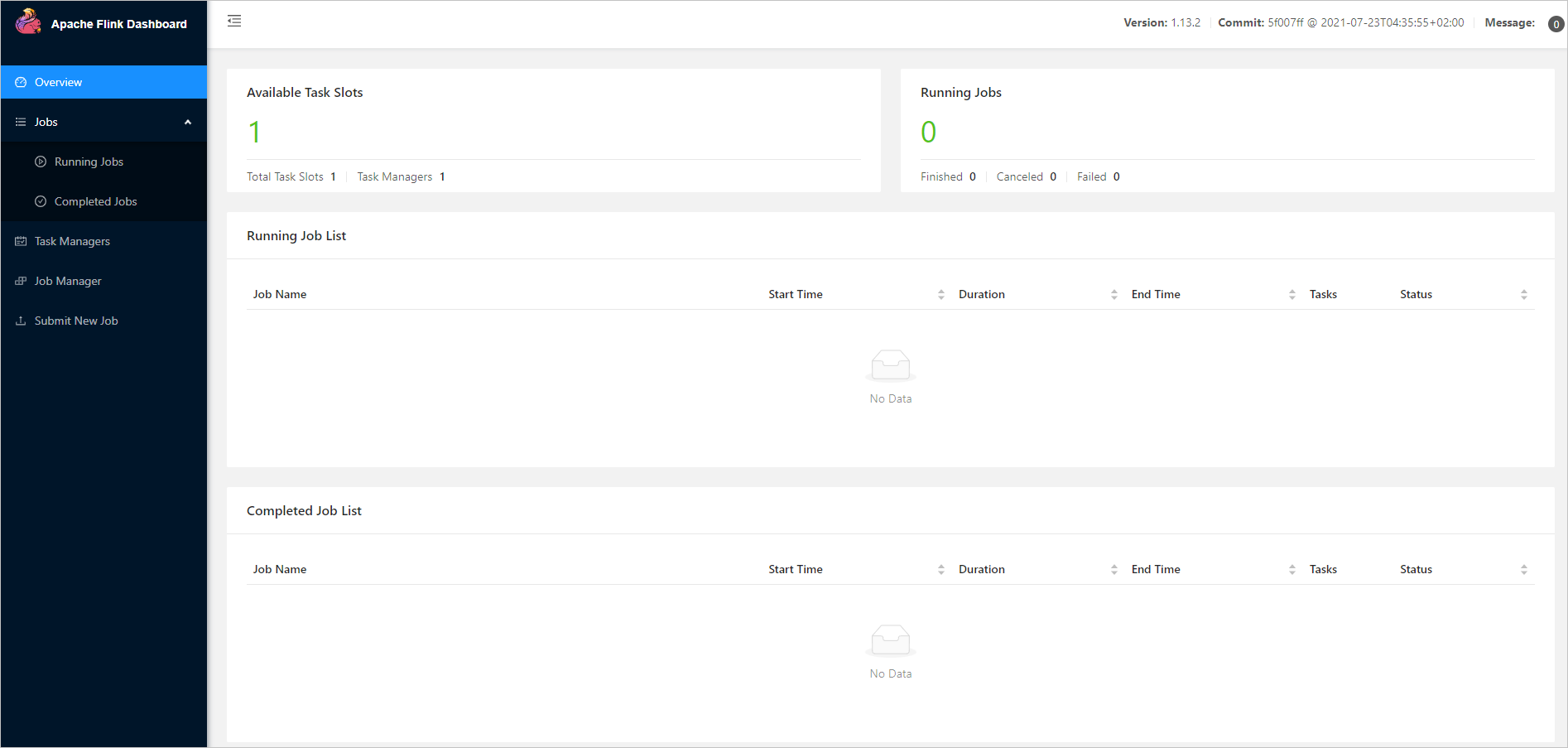
说明
执行
./bin/start-cluster.sh后,如果提示:bash: ./bin/start-cluster.sh: Permission denied。需要把flink-1.15.3目录下的所有-rw-rw-r--权限的文件的权限都设置为-rwxrwxrwx权限。示例如下:
[xxx@xxx /FLINK_HOME/flink-1.15.3] # chmod -R 777 /FLINK_HOME/flink-1.15.3/*使用下面的命令启动 Flink SQL CLI。
[xxx@xxx /FLINK_HOME/flink-1.15.3] #./bin/sql-client.sh启动成功后,可以看到如下的页面:

设置 checkpoint
在 Flink SQL CLI 中开启 checkpoint,每隔 3 秒做一次 checkpoint。
Flink SQL> SET execution.checkpointing.interval = 3s;
[INFO] Session property has been set.
创建 MySQL CDC 表
在 Flink SQL CLI 中创建 MySQL 数据库对应的表。
对于 MySQL 数据库中 test_mysql_to_ob 的表 tbl1 和 tbl2 使用 Flink SQL CLI 创建对应的表,用于同步这些底层数据库表的数据。
Flink SQL> CREATE TABLE mysql_tbl1 (
col1 INT PRIMARY KEY,
col2 VARCHAR(20),
col3 INT)
WITH (
'connector' = 'mysql-cdc',
'hostname' = 'xxx.xxx.xxx.xxx',
'port' = '3306',
'username' = 'root',
'password' = '******',
'database-name' = 'test_mysql_to_ob',
'table-name' = 'tbl1');
[INFO] Execute statement succeed.
Flink SQL> CREATE TABLE mysql_tbl2 (col1 INT PRIMARY KEY,
col2 VARCHAR(20))
WITH ('connector' = 'mysql-cdc',
'hostname' = 'xxx.xxx.xxx.xxx',
'port' = '3306',
'username' = 'root',
'password' = '******',
'database-name' = 'test_mysql_to_ob',
'table-name' = 'tbl2');
[INFO] Execute statement succeed.
有关 MySQL CDC Connector WITH 选项的详细信息,请参见 Connector Options。
创建 OceanBase CDC 表
在 Flink SQL CLI 中创建 OceanBase 数据库对应的表。创建 mysql_tbl1_and_tbl2 表,用来将关联后的数据写入 OceanBase 数据库中。
Flink SQL> CREATE TABLE mysql_tbl1_and_tbl2(
col1 INT PRIMARY KEY,
col2 INT,col3 VARCHAR(20),
col4 VARCHAR(20))
WITH ('connector' = 'jdbc',
'url' = 'jdbc:mysql://10.10.10.2:2881/test_mysql_to_ob',
'username' = 'root@mysql001',
'password' = '******',
'table-name' = 'mysql_tbl1_and_tbl2');
[INFO] Execute statement succeed.
有关 JDBC SQL Connector WITH 选项的详细信息,请参见 Connector Options。
在 Flink SQL CLI 中将数据写入 OceanBase 数据库中
使用 Flink SQL 将表 tbl1 与表 tbl2 关联,并将关联后的信息写入 OceanBase 数据库中。
Flink SQL> INSERT INTO mysql_tbl1_and_tbl2
SELECT t1.col1,t1.col3,t1.col2,t2.col2
FROM mysql_tbl1 t1,mysql_tbl2 t2
WHERE t1.col3=t2.col1;
[INFO] Submitting SQL update statement to the cluster...
Loading class `com.mysql.jdbc.Driver'. This is deprecated. The new driver class is `com.mysql.cj.jdbc.Driver'. The driver is automatically registered via the SPI and manual loading of the driver class is generally unnecessary.
[INFO] SQL update statement has been successfully submitted to the cluster:
Job ID: c5ee92498addf813858e448ec25e85af
说明
本文档测试示例使用的 MySQL 驱动(com.mysql.jdbc.Driver)是 MySQL Connector/J 5.1.47 版本。新版本 MySQL 驱动(com.mysql.cj.jdbc.Driver)请使用 MySQL Connector/J 8.x 版本。
查看关联数据写入 OceanBase 数据库情况
登录 OceanBase 数据数,在 test_mysql_to_ob 库中查看表 mysql_tbl1_and_tbl2 的数据。
obclient [test_mysql_to_ob]> SELECT * FROM mysql_tbl1_and_tbl2;
+------+------+-------------+------+
| col1 | col2 | col3 | col4 |
+------+------+-------------+------+
| 1 | 86 | China | +86 |
| 2 | 886 | Taiwan | +886 |
| 3 | 852 | Hong Kong | +852 |
| 4 | 853 | Macao | +853 |
| 5 | 850 | North Korea | +850 |
+------+------+-------------+------+
5 rows in set
查看数据更新情况
在 MySQL 数据库的表
tbl1和tbl2中插入分别插入一条数据。MySQL [test_mysql_to_ob]> INSERT INTO tbl1 VALUES(6,'code',673); Query OK, 1 row affected MySQL [test_mysql_to_ob]> INSERT INTO tbl2 VALUES(673,'+673'); Query OK, 1 row affected在 OceanBase 数据库中查看数据是否同步。
obclient [test_mysql_to_ob]> SELECT * FROM mysql_tbl1_and_tbl2; +------+------+-------------+------+ | col1 | col2 | col3 | col4 | +------+------+-------------+------+ | 1 | 86 | China | +86 | | 2 | 886 | Taiwan | +886 | | 3 | 852 | Hong Kong | +852 | | 4 | 853 | Macao | +853 | | 5 | 850 | North Korea | +850 | | 6 | 673 | code | +673 | +------+------+-------------+------+ 6 rows in set


