
基于湖库一体架构,统一管理结构化、半结构化与非结构化等多模态数据,一个系统承载事务处理、实时分析与 AI 工作负载。


评估对象兼容性
更新时间:2023-06-25 13:50:34
分享
OceanBase 迁移评估工具(OceanBase Migration Assessment,OMA)支持评估 Oracle、MySQL、PostgreSQL、TiDB 和 DB2 LUW、RDS MySQL、Polar MySQL、Polar O、DRDS 和 openGauss 数据库转换至 OceanBase 数据库的兼容性,并出具兼容性报告。本文为您介绍如何评估各类数据库的对象兼容性。
评估 Oracle 对象兼容性
前提条件
能够直接访问到需要评估的 Oracle 数据库,配置的数据库用户至少具备
create session和create resource权限,以确保能够正常连接。目前支持 10g/11g/12c/18c/19c 版本的 Oracle 数据库。配置的数据库用户需要具备
select any dictionary权限,本程序会扫描DBA_OBJECTS表,获取待评估的对象。配置的数据库用户需要具备
select_catalog_role角色,确保本程序能够正常使用DBMS_METADATA.GET_DDL函数来获取对应对象的 DDL 语句。
权限说明
您可以执行下述命令,检查用户是否具备相关权限。此处以 oma 作为执行评估任务的 Oracle 用户。
-- 该 SQL 的返回中应包含 CONNECT、RESOURCE 和 SELECT_CATALOG_ROLE
SELECT * FROM DBA_ROLE_PRIVS WHERE GRANTEE = 'oma';

-- 该 SQL 的返回中应包含 CREATE SESSION 和 SELECT ANY DICTIONARY
SELECT * FROM DBA_SYS_PRIVS WHERE GRANTEE = 'oma';
如果您需要给用户授予上述权限,请执行下述命令。
GRANT CREATE SESSION,RESOURCE TO oma;
GRANT SELECT ANY DICTIONARY TO oma;
GRANT SELECT_CATALOG_ROLE TO oma;
使用方法
请参考如下命令运行 start.sh,有关各参数的详细介绍,请参见 产品形态。如果是 windows 环境,请替换 sh bin/start.sh 为 start.bat。
sh bin/start.sh \
# 任务的名称,可以随意取值
--name test \
# 分析模式
--mode ANALYZE \
# 来源为数据库
--from-type DB \
# 评估方式
--evaluate-mode SOURCE_TARGET \
#源端数据库的类型
--source-db-type ORACLE \
#源端数据库的版本
--source-db-version 11g \
#源端数据库的地址
--source-db-host xxx.xxx.xxx.xxx \
# 源端数据库的端口
--source-db-port port \
#源端数据库的用户名
--source-db-user username \
# 源端数据库的密码
--source-db-password password \
# 源端数据库的 service-name
--source-db-service-name orcl11g.us.oracle.com \
# 需要评估的 Schema
--schemas "OBDBA" \
# 目标数据库的类型
--target-db-type OBORACLE \
# 目标数据库的版本
--target-db-version 4.0.0
运行进度提示
程序在运行中会显示如下运行进度提示。
[INFO ] 16:25:10.695 [work-thread-1] c.a.o.o.scheduler.tasks.CollectTask - scan finish ...
[INFO ] 16:25:10.695 [work-thread-0] c.a.o.oma.scheduler.tasks.ReportTask - report task report-DB-29e9e finish...
[INFO ] 16:25:10.695 [work-thread-1] c.a.o.o.scheduler.tasks.ScheduleTask - task : collect-DB -- 74eed finish ...
[INFO ] 16:25:10.695 [work-thread-0] c.a.o.o.scheduler.tasks.ScheduleTask - task : report-DB -- 29e9e finish ...
[INFO ] 16:25:15.612 [main] c.a.o.o.s.ScheduleServiceImpl - finished ...
[INFO ] 16:25:15.612 [main] c.a.o.o.s.ScheduleServiceImpl - finished running...
[INFO ] 16:25:15.637 [main] c.a.o.o.s.ScheduleServiceImpl - finished create report...
[ OBDBA(2|332) ] Progress: #################################################################################################### |100%
查看评估报告
运行完成后,终端会显示如下评估报告。
评估程序OMA运行完成,评估报告简报:
任务 : test_11g-20210527_162427 开始时间 : 2021.05.27 16:24:27 结束时间 : 2021.05.27 16:25:15

SCHEMA : OBDBA 评估耗时 : 47895 毫秒
+-------------------------------------------------------------------+
| schema: schema  | source: sourceDB      | target: targetDB      |
+-----------------+---------+---------+---------+---------+---------+
|  Object Type    |  pass   | convert | failure |  total  | percent |
+-----------------+---------+---------+---------+---------+---------+
| TABLE           | 186     | 0       | 1       | 187     |  99.5 % |
+-----------------+---------+---------+---------+---------+---------+
| PROCEDURE       | 4       | 0       | 0       | 4       |  100.0% |
+-----------------+---------+---------+---------+---------+---------+
| TRIGGER         | 0       | 0       | 1       | 1       |  0.0  % |
+-----------------+---------+---------+---------+---------+---------+
| PACKAGE         | 1       | 0       | 0       | 1       |  100.0% |
+-----------------+---------+---------+---------+---------+---------+
| SEQUENCE        | 2       | 0       | 0       | 2       |  100.0% |
+-----------------+---------+---------+---------+---------+---------+
| INDEX           | 127     | 0       | 0       | 127     |  100.0% |
+-----------------+---------+---------+---------+---------+---------+
| VIEW            | 9       | 0       | 0       | 9       |  100.0% |
+-----------------+---------+---------+---------+---------+---------+
| PACKAGE BODY    | 1       | 0       | 0       | 1       |  100.0% |
+-----------------+---------+---------+---------+---------+---------+
运行完成后,评估结果会写入 OMA 根目录下的 db/oma.sqlite 文件中。您可以通过 OMA 根目录下的
reportTool查看评估报告。进入
reportTool目录,双击index.html。在打开的页面,单击 授权并查看报告。

选择
oma.sqlite文件并打开。通常
oma.sqlite文件位于 OMA 根目录下的 db 文件夹中。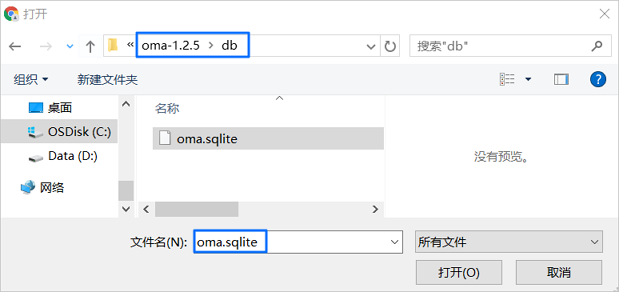
打开
oma.sqlite文件后,单击页面右上角的 选择报告 下拉列表,选择需要查看的迁移评估报告,即可进行查看。您可以在迁移评估页面,查看 迁移方案推荐、对象评估概览、SQL 评估概览 和 数据库画像。
- 迁移方案推荐
迁移方案推荐 页签展示迁移可行性分析、集群租户推荐和分布式改造推荐,通过评估迁移总体可行性、迁移风险和兼容性等内容,为您推荐合适的迁移方案。
- 对象评估概览
单击 对象评估概览 页签,您可以查看 兼容性概览 和 兼容性详情。
- SQL 评估概览
单击 SQL 评估概览 页签,您可以查看 兼容性概览 和 SQL 不兼容点汇总。
- 数据库画像
单击 数据库画像 页签,您可以查看 数据库实例概括、业务特殊 SQL 统计表、数据量分析 和 原数据库异常 SQL 等内容。
评估 MySQL 对象兼容性
评估 MySQL 对象和评估 Oracle 类型的方法仅命令参数不同。目前支持 MySQL 5.6、5.7 和 8.0 版本。
请参考如下命令运行 start.sh,有关各参数的详细介绍,请参见 产品形态。如果是 windows 环境,请替换 sh bin/start.sh 为 start.bat。
sh bin/start.sh \
# 任务的名称,可以随意取值
--name test \
# 分析模式
--mode ANALYZE \
# 来源为数据库
--from-type DB \
# 评估方式
--evaluate-mode SOURCE_TARGET \
# 源端数据库的类型
--source-db-type MYSQL \
# 源端数据库的版本
--source-db-version 5.7 \
# 源端数据库的地址
--source-db-host xxx.xxx.xxx.xxx \
# 源端数据库的端口
--source-db-port port \
# 源端数据库的用户名
--source-db-user username \
# 源端数据库的密码
--source-db-password password \
# 需要评估的 Schema
--schemas "test" \
# 目标数据库的类型
--target-db-type OBMYSQL \
# 目标数据库的版本
--target-db-version 4.0.0
评估过程和生成的评估报告与 Oracle 对象评估一致。
评估 PostgreSQL 对象兼容性
源端为 PostgreSQL 时,目标端支持 OBMYSQL 和 3.2.3 及以上版本的 OBORACLE。
目标端为 OBMYSQL 的示例语句如下:
sh bin/start.sh \
# 任务的名称,可以随意取值
--name task_name \
# 分析模式
--mode ANALYZE \
# 来源为数据库
--from-type DB \
# 评估方式
--evaluate-mode SOURCE_TARGET \
# 源端数据库的类型
--source-db-type POSTGRESQL \
# 源端数据库的版本,忽略小版本号
--source-db-version 10/11/12/13/14 \
# 源端数据库的地址
--source-db-host xxx.xxx.xxx.xxx \
# 源端数据库的端口
--source-db-port 3306 \
# 源端数据库的用户名
--source-db-user username \
# 源端数据库的密码
--source-db-password password \
# 需要评估的 Schema
# 由于 PostgreSQL 的特殊性,需要将 DB 和 Schema 写一起,用英文句号(.)分割
--schemas "postgres.public" \
# 目标数据库的类型,固定值 OBMYSQL
--target-db-type OBMYSQL \
# 目标数据库的版本
--target-db-version 4.0.0
目标端为 OBORACLE 的示例语句如下:
sh bin/start.sh \
# 任务的名称,可以随意取值
--name task_name \
# 分析模式
--mode ANALYZE \
# 来源为数据库
--from-type DB \
# 评估方式
--evaluate-mode SOURCE_TARGET \
# 源端数据库的类型
--source-db-type POSTGRESQL \
# 源端数据库的版本,忽略小版本号
--source-db-version 11 \
# 源端数据库的地址
--source-db-host xxx.xxx.xxx.xxx \
# 源端数据库的端口
--source-db-port 3306 \
# 源端数据库的用户名
--source-db-user username \
# 源端数据库的密码
--source-db-password password \
# 需要评估的 Schema。
# 由于 PostgreSQL 的特殊性,需要将 DB 和 Schema 写一起,用英文句号(.)分割
--schemas "postgres.public" \
# 目标数据库的类型,固定值 OBMYSQL
--target-db-type OBORACLE \
# 目标数据库的版本
--target-db-version 4.0.0
评估 TiDB 对象兼容性
评估 TiDB 对象兼容性的示例语句如下:
sh bin/start.sh \
# 任务名称,可以随意取值
--name task_name \
# 分析模式
--mode ANALYZE \
# 来源为数据库
--from-type DB \
# 评估方式
--evaluate-mode SOURCE_TARGET \
# 源端数据库的类型
--source-db-type TIDB \
# 源端数据库的版本,忽略小版本号
--source-db-version 3.0/4.0/5.0 \
# 源端数据库的地址
--source-db-host xxx.xxx.xxx.xxx \
# 源端数据库的端口
--source-db-port port \
# 源端数据库的用户名
--source-db-user username \
# 源端数据库的密码
--source-db-password password \
# 需要评估的 Schema,TiDB 暂不支持评估多个 Schema
--schemas "yewu_test" \
# 目标数据库的类型,固定值 OBMYSQL
--target-db-type OBMYSQL \
# 目标数据库的版本
--target-db-version 4.0.0
评估 DB2 LUW 对象兼容性
您可以通过以下两种方式评估 DB2 LUW 数据库对象的兼容性:
使用 OMA 直接连接源端数据库采集待评估的对象。
使用 db2look 工具导出待评估的数据库对象后,传递至 OMA 进行评估。
如果使用 OMA 连接 DB2 LUW 采集对象并进行评估,可以使用如下命令。
sh bin/start.sh \
# 任务的名称,可以随意取值
--name test11 \
# 分析模式
--mode ANALYZE \
# 来源为数据库
--from-type DB \
# 评估方式
--evaluate-mode SOURCE_TARGET \
# 源端数据库的类型
--source-db-type DB2LUW \
# 源端数据库的版本
--source-db-version 11.5.0 \
# 源端数据库的地址
--source-db-host host \
# 源端数据库的端口
--source-db-port port \
# 源端数据库的用户名
--source-db-user user \
# 源端数据库的密码
--source-db-password password \
# 源端数据库的名称
--source-db-name dbname \
# 待评估的 Schema
--schemas schema \
# 目标数据库的类型
--target-db-type OBORACLE \
# 目标数据库的版本
--target-db-version 4.0.0
如果使用 db2look 工具导出 DB2 LUW 数据库中待评估的对象再进行评估,可以执行如下命令进行评估。
sh bin/start.sh \
# 任务的名称,可以随意取值
--name textTest \
# 分析模式
--mode ANALYZE \
# 来源为文件
--from-type TEXT \
# 评估方式
--evaluate-mode SOURCE_TARGET \
# DDL 文件的位置
--source-file db2look.sql \
# 源端数据库的类型
--source-db-type DB2LUW \
# 源端数据库的版本
--source-db-version 11.1 \
# 源端数据库的 Schema
--schemas db2inst1 \
# 目标数据库的类型
--target-db-type OBORACLE \
# 目标数据库的版本
--target-db-version 4.0.0
OMA 3.4.0 及以上版本支持源端 DB2 LUW 至目标端 OceanBase 数据库 MySQL 租户 3.2.3 版本的兼容性评估。支持评估的内容如下:
数据字段类型评估。
DDL 评估:包括数据库表、索引和分区。
SQL 评估:包括 SQL 语法和函数。
sh bin/start.sh \
# 任务的名称,可以随意取值
--name test11 \
# 分析模式
--mode ANALYZE \
# 来源为数据库
--from-type DB \
# 评估方式
--evaluate-mode SOURCE_TARGET \
# 源端数据库的类型
--source-db-type DB2LUW \
# 源端数据库的版本
--source-db-version 10.1.0 \
# 源端数据库的地址
--source-db-host host \
# 源端数据库的端口
--source-db-port port \
# 源端数据库的用户名
--source-db-user user \
# 源端数据库的密码
--source-db-password password \
# 源端数据库的名称
--source-db-name dbname \
# 待评估的 Schema
--schemas "s1,s2" \
# 目标数据库的类型
--target-db-type OBMYSQL \
# 目标数据库的版本
--target-db-version 4.0.0
评估 RDS MySQL 对象
您可以通过如下命令,对 RDS MySQL 中的数据库对象进行评估。
sh bin/start.sh \
# 任务名称,可以随意取值
--name test \
# 分析模式
--mode ANALYZE \
# 来源为数据库
--from-type DB \
# 评估方式
--evaluate-mode SOURCE_TARGET \
# 源端数据库的类型
--source-db-type RDSMYSQL \
# 源端数据库的版本
--source-db-version X \
# 源端数据库的地址
--source-db-host rds-public-address \
# 源端数据库的端口
--source-db-port port \
# 源端数据库的用户名
--source-db-user username \
# 源端数据库的密码
--source-db-password password \
# 需要评估的 Schema
--schemas "s1,s2"
# 目标数据库的类型
--target-db-type OBMYSQL \
# 目标数据库的版本
--target-db-version 4.0.0
评估 Polar MySQL 对象
您可以通过如下命令,对 PolarDB MySQL 中的数据库对象进行评估。
sh bin/start.sh \
# 任务名称,可以随意取值
--name test \
# 分析模式
--mode ANALYZE \
# 来源为数据库
--from-type DB \
# 评估方式
--evaluate-mode SOURCE_TARGET \
# 源端数据库的类型
--source-db-type POLARMYSQL \
# 源端数据库的版本
--source-db-version X \
# 源端数据库的地址
--source-db-host polardb-public-address \
# 源端数据库的端口
--source-db-port port \
# 源端数据库的用户名
--source-db-user username \
# 源端数据库的密码
--source-db-password password \
# 需要评估的 Schema
--schemas "s1,s2"
# 目标数据库的类型
--target-db-type OBMYSQL \
# 目标数据库的版本
--target-db-version 4.0.0
评估 Polar O 对象
您可以通过如下命令,对 Polar O 中的数据库对象进行兼容性评估。
sh bin/start.sh \
# 任务名称,可以随意取值
--name test \
# 分析模式
--mode ANALYZE \
# 来源为数据库
--from-type DB \
# 评估方式
--evaluate-mode SOURCE_TARGET \
# 源端数据库的类型
--source-db-type POLARO \
# 源端数据库的版本
--source-db-version X \
# 源端数据库的地址
--source-db-host polardb-public-address \
# 源端数据库的端口
--source-db-port port \
# 源端数据库的用户名
--source-db-user username \
# 源端数据库的密码
--source-db-password xxxx \
# 需要评估的 Schema
--schemas "s1,s2"
# 目标数据库的类型
--target-db-type OBORACLE \
# 目标数据库的版本
--target-db-version 4.0.0
评估 DRDS 对象兼容性
OMA 3.4.0 及以上版本,支持通过命令行评估 DRDS,并支持 DRDS 中表定义的兼容性评估和转换。
sh bin/start.sh \
# 任务名称,可以随意取值
--name test \
# 分析模式
--mode ANALYZE \
# 来源为数据库
--from-type DB \
# 评估方式
--evaluate-mode SOURCE_TARGET \
# 源端数据库的类型
--source-db-type DRDS \
# 源端数据库的版本
--source-db-version 8.0 \
# 源端数据库的地址
--source-db-host host \
# 源端数据库的端口
--source-db-port port \
# 源端数据库的用户名
--source-db-user username \
# 源端数据库的密码
--source-db-password password \
# 需要评估的 Schema
--schemas oma
# 目标数据库的类型
--target-db-type OBMYSQL \
# 目标数据库的版本
--target-db-version 4.0.0
评估 MSSQL 对象兼容性
OMA 3.4.0 及以上版本,支持通过命令行评估 MSSQL。您可以通过如下命令,对 MSSQL 中的数据库对象进行兼容性评估。
sh bin/start.sh
# 任务的名称,可以随意取值
--name testMsSql \
# 分析模式
--mode ANALYZE \
# 来源为数据库
--from-type DB \
# 评估方式
--evaluate-mode SOURCE_TARGET \
# 来源数据库的类型
--source-db-type SQLSERVER \
# 来源数据库的版本
--source-db-version X \
# 来源数据库的地址
--source-db-host host \
# 来源数据库的端口
--source-db-port port \
# 来源数据库的用户名
--source-db-user username \
# 来源数据库的密码
--source-db-password password \
# 目标数据库的类型
--target-db-type OBORACLE \
# 目标数据库的版本
--target-db-version 3.2.30
评估 openGauss 对象兼容性
OMA 4.0.0 及以上版本,支持通过命令行评估 openGauss。您可以通过如下命令,对 openGauss 中的数据库对象进行兼容性评估。
sh bin/start.sh \
# 任务的名称,可以随意取值
--name task_name \
# 分析模式
--mode ANALYZE \
# 来源为数据库
--from-type DB \
# 评估方式
--evaluate-mode SOURCE_TARGET \
# 源端数据库的类型
--source-db-type GAUSSDB \
# 源端数据库的版本,忽略小版本号
--source-db-version X \
# 源端数据库的地址
--source-db-host host \
# 源端数据库的端口
--source-db-port port \
# 源端数据库的用户名
--source-db-user username \
# 源端数据库的密码
--source-db-password password \
# 需要评估的 Schema
# 由于 openGauss 的特殊性,需要将 DB 和 Schema 写一起,用英文句号(.)分割
--schemas "postgres.public" \
# 目标数据库的类型,固定值 OBMYSQL
--target-db-type OBMYSQL \
# 目标数据库的版本
--target-db-version 4.0.0


