基于湖库一体架构,统一管理结构化、半结构化与非结构化等多模态数据,一个系统承载事务处理、实时分析与 AI 工作负载。


划线反馈
OBServer 重启失败,错误代码 5019
更新时间:2023-12-07 03:16
分享
适用版本:V2.2.x内容类型:Troubleshoot
介绍 OBServer 重启失败报 5019 错误时,如何进行问题排查并解决问题。
问题现象
OBServer 重启后启动失败,日志信息如下:
[2020-07-17 23:29:37.057191] ERROR [SERVER] main (main.cpp:447) [6656][0][Y0-0000000000000000] [lt=42] [dc=0] observer start fail(ret=-5019) BACKTRACE:0x9989299 0x992b639 0x4128f5 0x412169 0x55fc585 0x7fd5f3871444 0x5674474
[2020-07-17 23:28:40.852683] WARN [STORAGE] read_checkpoint (ob_pg_meta_checkpoint_reader.cpp:60) [6656][0][Y0-0000000000000000] [lt=17] [dc=0] fail to load partition(ret=-5019)
[2020-07-17 23:28:40.852698] WARN [STORAGE] read_checkpoint (ob_pg_all_meta_checkpoint_reader.cpp:55) [6656][0][Y0-0000000000000000] [lt=12] [dc=0] fail to read checkpoint(ret=-5019)
[2020-07-17 23:28:40.852703] WARN [STORAGE] read_checkpoint (ob_tenant_file_pg_meta_checkpoint_reader.cpp:44) [6656][0][Y0-0000000000000000] [lt=5] [dc=0] fail to read checkpoint(ret=-5019)
[2020-07-17 23:28:40.852718] INFO [STORAGE] ob_store_file_system.cpp:533 [6656][0][Y0-0000000000000000] [lt=4] [dc=0] ref cnt is 0, and succeed to unlink block, (macro_id=329028-0-0-0[329028], *this={file_type_:2, tenant_id_:1005, file_id_:1594894106526013})
[2020-07-17 23:28:40.852738] INFO [STORAGE] ob_store_file_system.cpp:533 [6656][0][Y0-0000000000000000] [lt=12] [dc=0] ref cnt is 0, and succeed to unlink block, (macro_id=329027-0-0-0[329027], *this={file_type_:2, tenant_id_:1005, file_id_:1594894106526013})
问题原因
根据错误信息,该问题是由于在 OBServer 重启过程中删除了租户,导致启动过程中进行回放时无法获取租户的兼容性信息。
影响版本
OceanBase 数据库 V2.2.30-BP11 前的版本
解决方式
可以通过以下三种方法解决该问题:
将 OceanBase 数据库升级到 OceanBase V2.2.30-BP11 及后续版本,有关升级 OceanBase 的方法,请参见《OceanBase 数据库升级指南》。
如果无法升级,可以执行以下操作:
确保 observer 进程不存在。
[root@hostname /]# ps -ef|grep observer如果 observer 进程存在,手动停止 observer 进程。其中
observer_pid表示 observer 进程的进程 ID。[root@hostname /]# kill -9 <observer_pid>手动清理 slog、clog、ilog 及 shm 文件,并手动清理
/data/1目录下的 sstable 文件。[root@hostname /]# cd /home/admin/oceanbase/store/<cluster_name>/ [root@hostname cluster_name]# rm -rf slog [root@hostname cluster_name]# rm -rf clog [root@hostname cluster_name]# rm -rf ilog [root@hostname cluster_name]# rm -rf *_shm [root@hostname cluster_name]# cd /data/1 [root@hostname 1]# rm -rf <cluster_name>/sstable使用 admin 账户启动 observer 进程。
[root@hostname /]# cd /home/admin/oceanbase/
[root@hostname oceanbase]$ su admin
[admin@hostname oceanbase]$ ./bin/observer -i bond0 -p xxxx -P xxx -n PoC -c 1 -z ZONE_3 -d /home/admin/oceanbase/store/ -l info -o 'rootservice_list=x.x.x.x:xxxx:xxxx;x.x.x.x:xxxx:xxxx;x.x.x.x:xxxx:xxxx,datafile_disk_percentage=20,config_additional_dir=/data/log1/etc2;/data/1/etc3'
注意
清理过程不能删除文件所在的目录,并保证目录权限为 775。
在 OCP 中执行节点下线,再进行节点上线即可解决。
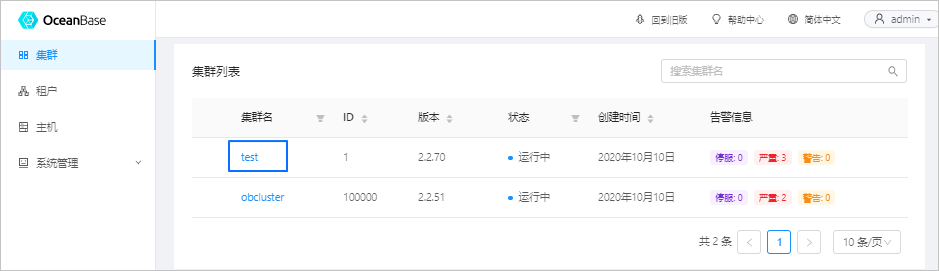
登录 OCP 平台,在左侧导航栏单击 集群 ,在 集群列表 页签中选择要下线节点的集群,如下图所示。
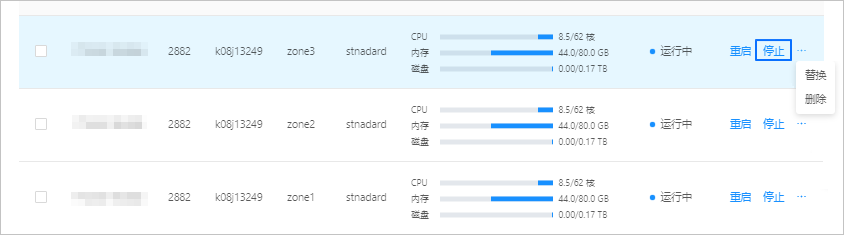
在 OBServer 列表中重启失败的 OBServer 对应的 操作 列,单击 停止 。
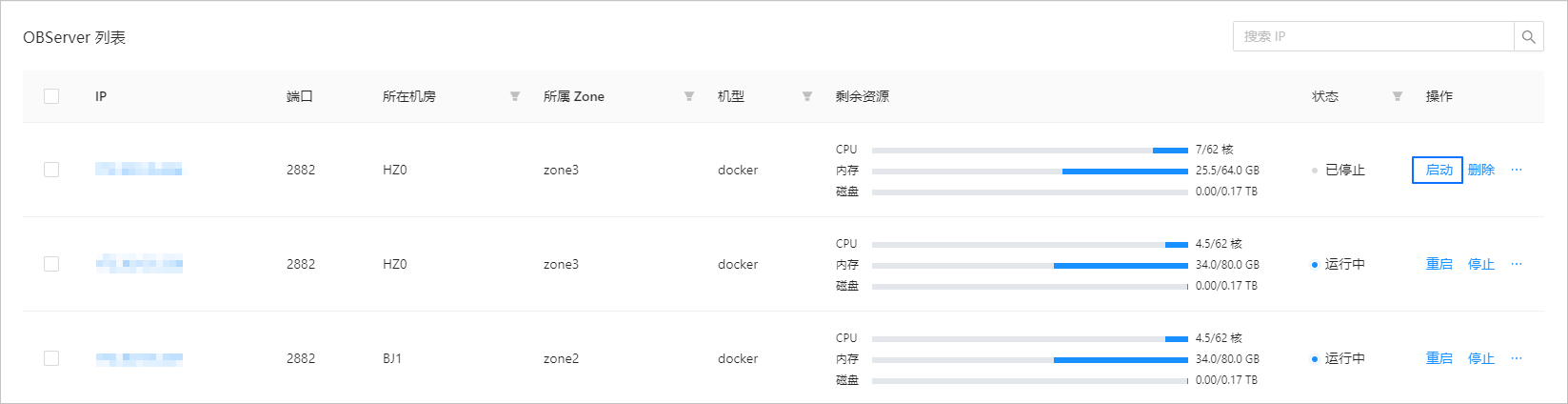
在停止 OBServer 任务完成后,在 OBServer 列表的 操作 列,单击 启动 。