
问题现象
OCP 接管通过 obd 部署的 OceanBase 集群后,新增 OBServer 节点时存在如下报错:
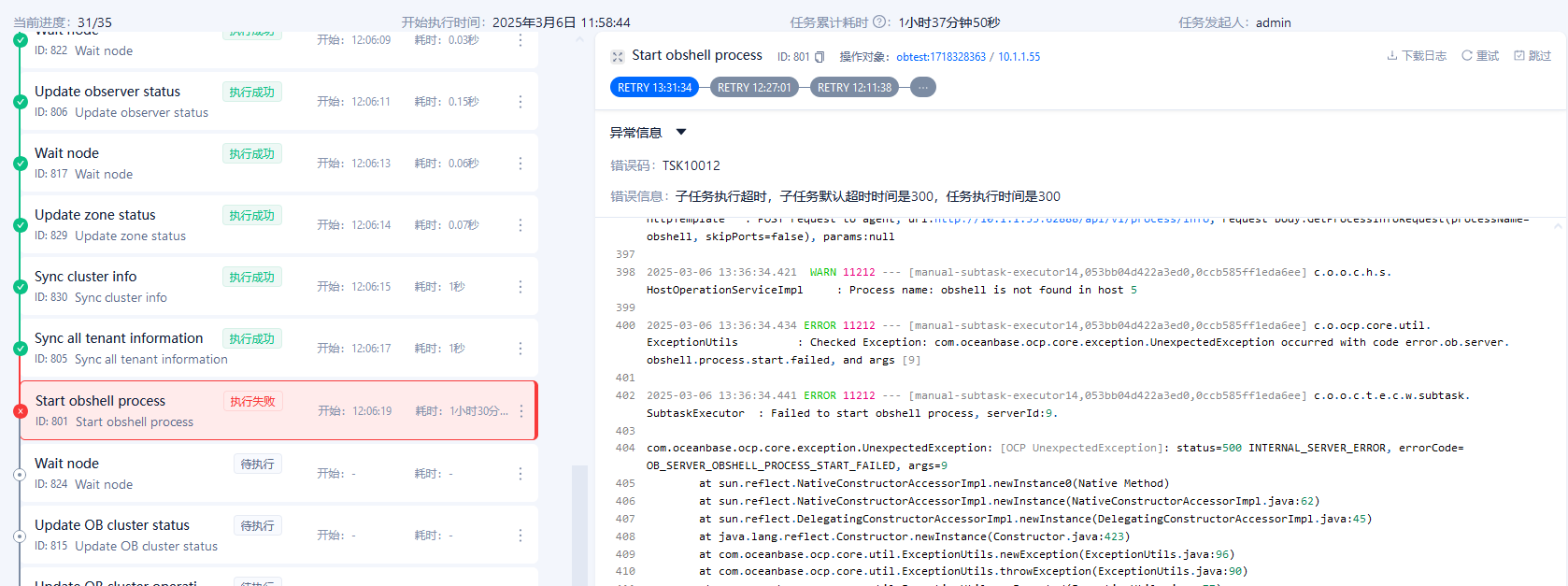
查看 ocp-server.log 日志,存在类似如下信息:
2025-03-06 13:36:34.371  INFO 11212 --- [manual-subtask-executor14,053bb04d422a3ed0,0ccb585ff1eda6ee] c.o.o.c.a.p.HostAgentProcessServiceImpl  : Getting all OCP agent processes on host 5

2025-03-06 13:36:34.404  INFO 11212 --- [manual-subtask-executor14,053bb04d422a3ed0,0ccb585ff1eda6ee] c.o.o.e.internal.template.HttpTemplate   : POST request to agent, url:
http://xx.xx.xx.xx:62888/api/v1/process/info
, request body:GetProcessInfoRequest(processName=obshell, skipPorts=false), params:null

2025-03-06 13:36:34.421  WARN 11212 --- [manual-subtask-executor14,053bb04d422a3ed0,0ccb585ff1eda6ee] c.o.o.c.h.s.HostOperationServiceImpl     : Process name: obshell is not found in host 5

2025-03-06 13:36:34.434 ERROR 11212 --- [manual-subtask-executor14,053bb04d422a3ed0,0ccb585ff1eda6ee] c.o.ocp.core.util.ExceptionUtils         : Checked Exception: com.oceanbase.ocp.core.exception.UnexpectedException occurred with code error.ob.server.obshell.process.start.failed, and args [9]

2025-03-06 13:36:34.441 ERROR 11212 --- [manual-subtask-executor14,053bb04d422a3ed0,0ccb585ff1eda6ee] c.o.o.c.t.e.c.w.subtask.SubtaskExecutor  : Failed to start obshell process, serverId:9.

com.oceanbase.ocp.core.exception.UnexpectedException: [OCP UnexpectedException]: status=500 INTERNAL_SERVER_ERROR, errorCode=OB_SERVER_OBSHELL_PROCESS_START_FAILED, args=9

    at sun.reflect.NativeConstructorAccessorImpl.newInstance0(Native Method)

    at sun.reflect.NativeConstructorAccessorImpl.newInstance(NativeConstructorAccessorImpl.java:62)

    at sun.reflect.DelegatingConstructorAccessorImpl.newInstance(DelegatingConstructorAccessorImpl.java:45)

    at java.lang.reflect.Constructor.newInstance(Constructor.java:423)
查看报错节点的 mgragent.log 日志,存在类似如下信息:
2025-03-06T12:06:20.1219+08:00 INFO [7317,] caller=shell/exec.go:163:execute: execute shell command failed, command=Command{user=root, program=sh, outputType=std, cmd=export OB_ROOT_password=xxx admin start --ip xx.xx.xx.xx --port 2886, timeout=10s}, exitCode=1, error=sh: -c: line 0: syntax error near unexpected token `('
sh: -c: line 0: `export OB_ROOT_PASSWORD=]69in7z(&*;/oceanbase/obtest/oceanbase/bin/obshell admin start --ip xx.xx.xx.xx --port 2886'
: exit status 1 fields:, duration=4.981677ms
2025-03-06T12:06:20.12214+08:00 ERROR [7317,] caller=process/process.go:309:StartObShellProcess: failed to execute start obshell process command: failed to execute command: Command{user=root, program=sh, outputType=std, cmd=export OB_ROOT_password=xxx admin start --ip xx.xx.xx.xx --port 2886, timeout=10s}, exitCode: 1, output: , error: sh: -c: line 0: syntax error near unexpected token `('
sh: -c: line 0: `export OB_ROOT_PASSWORD=]69in7z(&*;/oceanbase/obtest/oceanbase/bin/obshell admin start --ip xx.xx.xx.xx --port 2886'
: exit status 1, execute: export OB_ROOT_PASSWORD=]69in7z(&*;/oceanbase/obtest/oceanbase/bin/obshell admin start --ip xx.xx.xx.xx --port 2886
2025-03-06T12:06:20.12224+08:00 INFO [7317,053bb04d422a3ed0] caller=common/middleware.go:152:func1: API response OK: [POST /api/v1/process/startObShellProcess, client=10.1.1.61, ocpServerIp=10.1.1.61, traceId=053bb04d422a3ed0, duration=5.487485ms, status=200, data=<nil>]
可能原因
扩容 OBServer 节点时,OB_ROOT_PASSWORD 存在特殊字符时触发报错。
影响版本
OCP V4.3.6 以下所有版本。
解决方法及规避方式
根本解决方案
OCP 升级至 V4.3.6 版本。
临时规避方式
在集群下的任一 OBServer 节点执行如下步骤:
终止所有节点(包括新扩容节点)上的 obshell 进程,包括 server 进程和 daemon(守护)进程,终止后确认是否还存在 obshell 进程。
删除所有节点(包括新扩容节点)
/oceanbase/obtest/oceanbase/目录下的.meta文件。连接 OceanBase 集群,执行如下命令删除 OCS 数据库。
drop database ocs;将新扩容节点上的二进制文件
/oceanbase/obtest/oceanbase/bin/obshell替换到其他节点中。在任一节点上执行如下命令:
export OB_ROOT_PASSWORD=“******”;
/oceanbase/obtest/oceanbase/bin/obshell cluster start -a
在 OCP 任务详情中,跳过 “Start obshell process” 子任务。


