
基于湖库一体架构,统一管理结构化、半结构化与非结构化等多模态数据,一个系统承载事务处理、实时分析与 AI 工作负载。


划线反馈
批量执行 DDL 和批量导入数据时如何绕过外键约束
更新时间:2026-05-21 09:16
分享
适用版本:V1.4.x、V2.1.x、V2.2.x、V3.1.x、V3.2.x、V4.0.x、V4.1.x、V4.2.x内容类型:How-to
本文介绍当 Schema 中存在外键约束时,并且用户想批量创建 Schema 和批量导入数据,可以如何绕过外键约束。
外部业务在批量执行 DDL 进行数据库 Schema 的初始化以及批量导入数据时,如果 Schema 中存在外键约束,需要用户严格按照先创建父表再创建子表以及先导入父表数据再导入子表数据的顺序执行 Schema 和数据的导入,否则会遇到报错 ORA-00942: table or view does not exist / ORA-02291: integrity constraint violated - parent key not found。
详细说明
当 Schema 中存在外键约束时,绕过外键约束来创建表结构和导入表数据的方法需要针对 OceanBase 数据库 MySQL 模式和 OceanBase 数据库 Oracle 模式在两种不同的租户模式分别处理。
准备测试示例
说明
下面六张表,因为它们之间存在外键约束,所以需要按照 C -> B -> A -> D -> F -> E 的顺序建表,以及同样的顺序导入表数据,否则会遇到报错。
create table C (
  id int primary key
);

create table B (
  id int primary key,
  constraint B_FK foreign key (id) references C (id)
);

create table A (
  id int primary key,
  constraint A_FK foreign key (id) references B (id)
);

create table D (
  id int primary key,
  constraint D_FK foreign key (id) references A (id)
);

create table F (
  id int primary key,
  constraint F_FK foreign key (id) references D (id)
);

create table E (
  id int primary key,
  constraint E_FK foreign key (id) references F (id)
);

insert into C values (1),(2),(3),(4),(5),(6);
insert into B values (1),(2),(3),(4),(5),(6);
insert into A values (1),(2),(3),(4),(5),(6);
insert into D values (1),(2),(3),(4),(5),(6);
insert into F values (1),(2),(3),(4),(5),(6);
insert into E values (1),(2),(3),(4),(5),(6);

commit;
OceanBase 数据库 MySQL 租户
OceanBase 数据库 V2.x/V3.x/V4.x 版本中可以通过关闭 foreign_key_checks 租户变量来绕过 DML 语句的外键约束。
MySQL [(none)]> select @@version_comment from dual;
+--------------------------------------------------------------------------------------------------------------+
| @@version_comment                                                                                            |
+--------------------------------------------------------------------------------------------------------------+
| OceanBase 2.2.77 (r116010032023022813-4f4fbb6de5d75b4db00ee05d44d56d8c1500c21c) (Built Feb 28 2023 13:48:43) |
+--------------------------------------------------------------------------------------------------------------+
1 row in set (0.00 sec)

MySQL [test]> show variables like 'foreign_key_checks';
+--------------------+-------+
| Variable_name      | Value |
+--------------------+-------+
| foreign_key_checks | ON    |
+--------------------+-------+
1 row in set (0.00 sec)

MySQL [test]> insert into E values (1),(2),(3),(4),(5),(6);
ERROR 1452 (23000): Cannot add or update a child row: a foreign key constraint fails
MySQL [test]> set foreign_key_checks=0;
Query OK, 0 rows affected (0.00 sec)

MySQL [test]> insert into E values (1),(2),(3),(4),(5),(6);
Query OK, 6 rows affected (0.00 sec)
Records: 6  Duplicates: 0  Warnings: 0
OceanBase 数据库 V2.x/V3.x 版本中无法通过关闭 foreign_key_checks 来绕过 DDL 语句的外键约束,需要用户自行保证先创建好父表,然后才能创建子表。
从 OceanBase 数据库 V4.0 版本开始支持关闭 DDL 语句的外键约束。
MySQL [(none)]> select @@version_comment from dual;
+---------------------------------------------------------------------------------------------------------------+
| @@version_comment                                                                                             |
+---------------------------------------------------------------------------------------------------------------+
| OceanBase 4.2.1.9 (r109010022024101120-45c3c04b7bd9a2070784456c39484ce45e9f9d2c) (Built Oct 11 2024 20:36:32) |
+---------------------------------------------------------------------------------------------------------------+
1 row in set (0.00 sec)

MySQL [(none)]> use test;
Database changed
MySQL [test]> show variables like 'foreign_key_checks';
+--------------------+-------+
| Variable_name      | Value |
+--------------------+-------+
| foreign_key_checks | ON    |
+--------------------+-------+
1 row in set (0.00 sec)

MySQL [test]> create table E (
id int primary key,
constraint E_FK foreign key (id) references F (id));
ERROR 1146 (42S02): Table doesn't exist
MySQL [test]> set foreign_key_checks=0;
Query OK, 0 rows affected (0.00 sec)

MySQL [test]> create table E (
id int primary key,
constraint E_FK foreign key (id) references F (id));
Query OK, 0 rows affected (0.19 sec)
OceanBase 数据库 Oracle 租户
OceanBase 数据库 V2.x/V3.x/V4.2.1 BP2(不含)之前的版本中可以关闭 foreign_key_checks 租户变量,但实际上并不生效。
obclient(SYS@oracle)[SYS]> show variables like 'foreign_key_checks';
+--------------------+-------+
| VARIABLE_NAME      | VALUE |
+--------------------+-------+
| foreign_key_checks | ON    |
+--------------------+-------+
1 row in set (0.001 sec)

obclient(SYS@oracle)[SYS]> set foreign_key_checks=0;
Query OK, 0 rows affected (0.000 sec)

obclient(SYS@oracle)[SYS]> show variables like 'foreign_key_checks';
+--------------------+-------+
| VARIABLE_NAME      | VALUE |
+--------------------+-------+
| foreign_key_checks | OFF   |
+--------------------+-------+
1 row in set (0.001 sec)

obclient(SYS@oracle)[SYS]> insert into E values (1),(2),(3),(4),(5),(6);
ORA-02291: integrity constraint violated - parent key not found
从 OceanBase 数据库 V4.2.1 BP2 版本开始废弃 Oracle 模式下 foreign_key_checks 租户变量。即 foreign_key_checks 变为 MySQL Only,Oracle 模式上可以设置,但即使设置为 0 也一直是 ON 的,无法关闭。
obclient(SYS@oracle)[SYS]> select @@foreign_key_checks from dual;
+----------------------+
| @@FOREIGN_KEY_CHECKS |
+----------------------+
|                    1 |
+----------------------+
1 row in set (0.002 sec)

obclient(SYS@oracle)[SYS]> set foreign_key_checks=0;
Query OK, 0 rows affected (0.001 sec)

obclient(SYS@oracle)[SYS]> select @@foreign_key_checks from dual;
+----------------------+
| @@FOREIGN_KEY_CHECKS |
+----------------------+
|                    1 |
+----------------------+
1 row in set (0.000 sec)

obclient(SYS@oracle)[SYS]> set foreign_key_checks=OFF;
Query OK, 0 rows affected (0.000 sec)

obclient(SYS@oracle)[SYS]> select @@foreign_key_checks from dual;
+----------------------+
| @@FOREIGN_KEY_CHECKS |
+----------------------+
|                    1 |
+----------------------+
1 row in set (0.000 sec)
所有版本的 OceanBase 数据库 Oracle 租户都无法通过关闭 foreign_key_checks 来绕过 DDL 语句的外键约束,需要用户自行保证先创建好父表,然后才能创建子表。
所有版本的 OceanBase 数据库 Oracle 租户可以通过禁用外键约束来批量导入数据,具体步骤如下。
先导入表结构,对于失败的表,手工创建下表结构,然后通过如下语句。
select 'alter table ' || owner || '.' || TABLE_NAME || ' DISABLE CONSTRAINT ' || CONSTRAINT_NAME || ';' from USER_CONSTRAINTS where CONSTRAINT_TYPE='R' and STATUS='ENABLED';批量生成禁用外键约束的语句,然后批量执行这些语句,暂时先禁用掉外键约束。
等数据都导入后,再批量执行
enable constraint的语句。示例如下。
obclient(TEST2@oracle)[TEST2]> insert into E values (1),(2),(3),(4),(5),(6);
ORA-02291: integrity constraint violated - parent key not found
obclient(TEST2@oracle)[TEST2]> select 'alter table ' || owner || '.' || TABLE_NAME || ' DISABLE CONSTRAINT ' || CONSTRAINT_NAME || ';' from USER_CONSTRAINTS where CONSTRAINT_TYPE='R' and STATUS='ENABLED';
+---------------------------------------------------------------------------------+
| 'ALTERTABLE'||OWNER||'.'||TABLE_NAME||'DISABLECONSTRAINT'||CONSTRAINT_NAME||';' |
+---------------------------------------------------------------------------------+
| alter table TEST2.B DISABLE CONSTRAINT B_FK;                                    |
| alter table TEST2.A DISABLE CONSTRAINT A_FK;                                    |
| alter table TEST2.D DISABLE CONSTRAINT D_FK;                                    |
| alter table TEST2.F DISABLE CONSTRAINT F_FK;                                    |
| alter table TEST2.E DISABLE CONSTRAINT E_FK;                                    |
+---------------------------------------------------------------------------------+
5 rows in set (0.010 sec)

obclient(TEST2@oracle)[TEST2]> alter table TEST2.B DISABLE CONSTRAINT B_FK;
Query OK, 0 rows affected (0.193 sec)

obclient(TEST2@oracle)[TEST2]> alter table TEST2.A DISABLE CONSTRAINT A_FK;
Query OK, 0 rows affected (0.250 sec)

obclient(TEST2@oracle)[TEST2]> alter table TEST2.D DISABLE CONSTRAINT D_FK;
Query OK, 0 rows affected (0.245 sec)

obclient(TEST2@oracle)[TEST2]> alter table TEST2.F DISABLE CONSTRAINT F_FK;
Query OK, 0 rows affected (0.269 sec)

obclient(TEST2@oracle)[TEST2]> alter table TEST2.E DISABLE CONSTRAINT E_FK;
Query OK, 0 rows affected (0.253 sec)

obclient(TEST2@oracle)[TEST2]> insert into E values (1),(2),(3),(4),(5),(6);
Query OK, 6 rows affected (0.033 sec)
Records: 6  Duplicates: 0  Warnings: 0
通过 ODC 工具来自动调整父表和子表的创建顺序
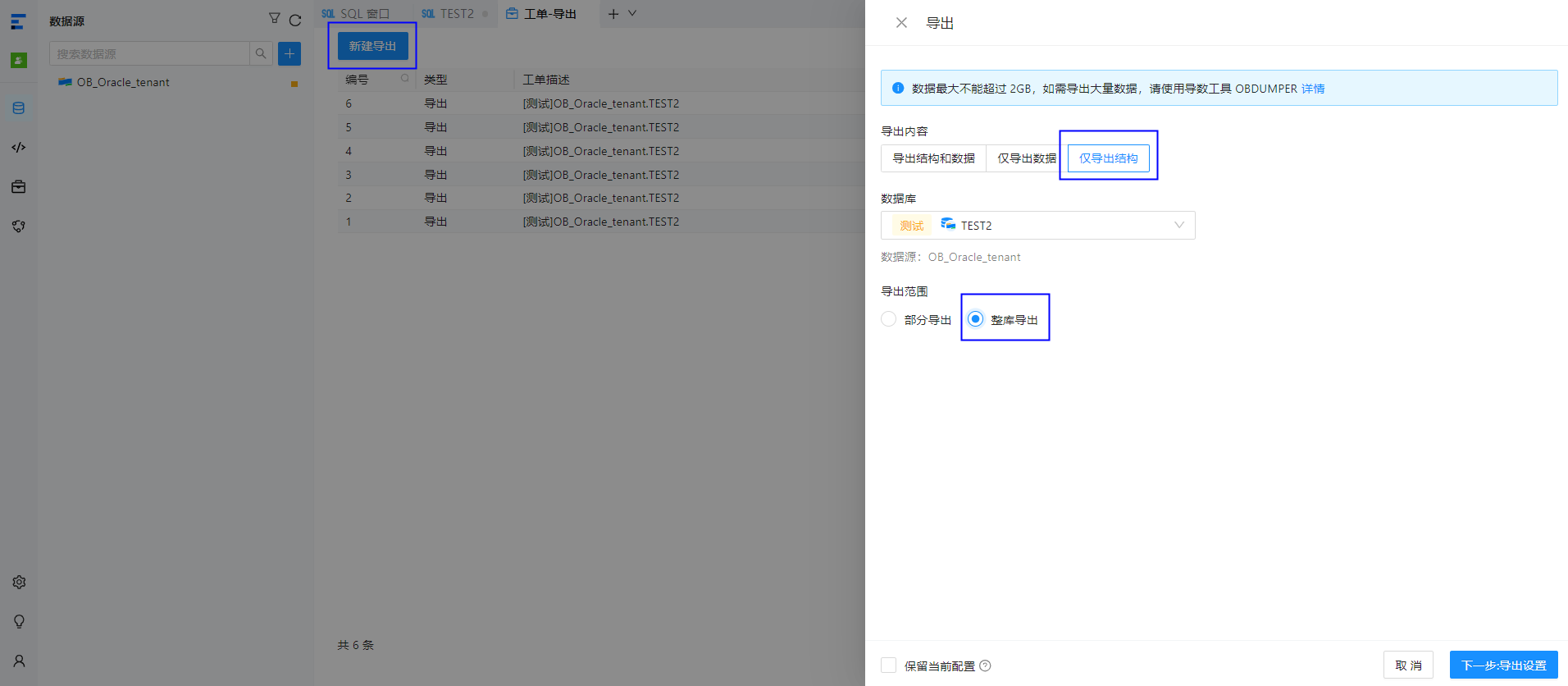
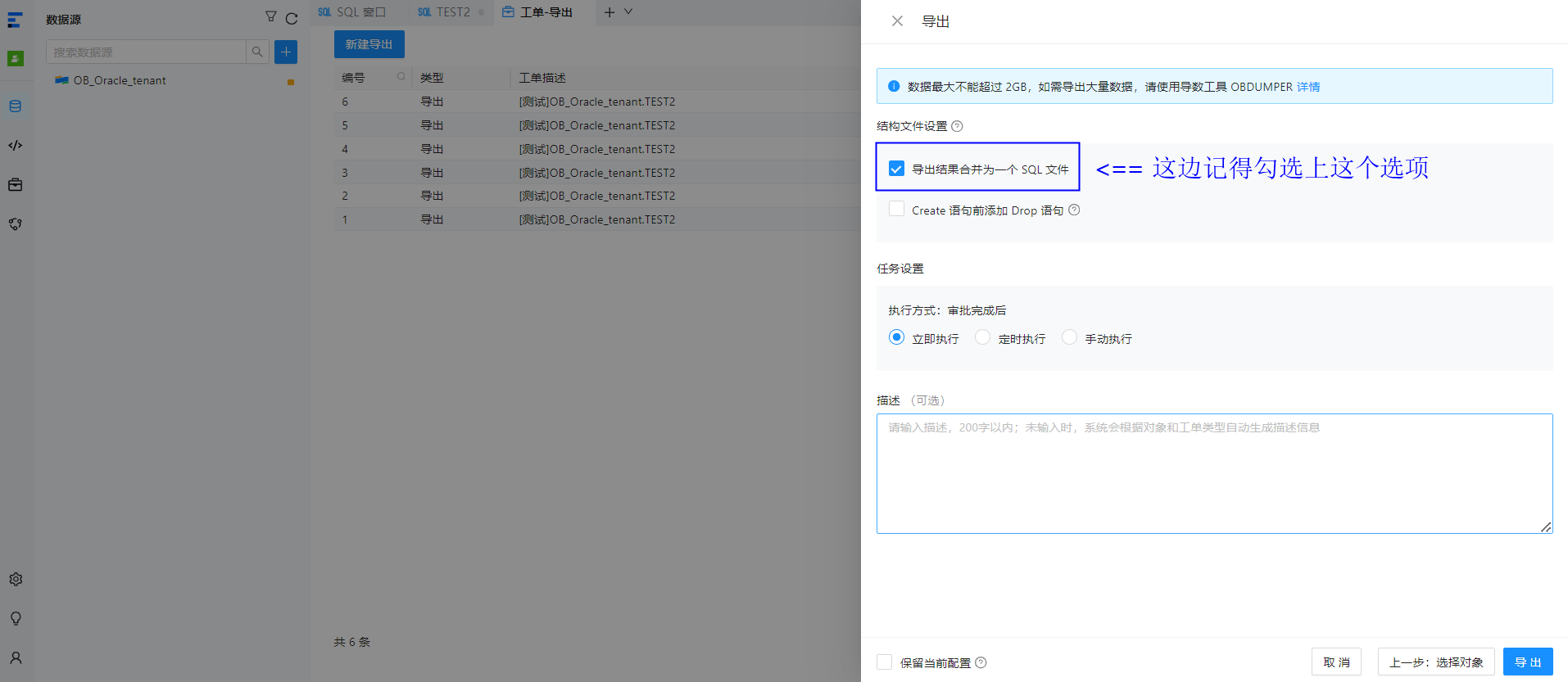
对于表结构导出如果希望保持外键依赖顺序逆序,可使用 ODC 导出,在配置导出任务时勾选 【导出结果合并为一个 SQL 文件】,会自动给把 DDL 按照外键依赖调整 table 顺序。
以
C -> B -> A -> D -> F -> E的顺序建表,且后面一张表是前面一张表的子表,如 B 依赖于 C,A 依赖于 B,测试示例如下。obclient(TEST2@oracle)[TEST2]> create table C (id int primary key); Query OK, 0 rows affected (0.175 sec) obclient(TEST2@oracle)[TEST2]> create table B ( id int primary key, constraint B_FK foreign key (id) references C (id)); Query OK, 0 rows affected (0.223 sec) obclient(TEST2@oracle)[TEST2]> create table A ( id int primary key, constraint A_FK foreign key (id) references B (id)); Query OK, 0 rows affected (0.223 sec) obclient(TEST2@oracle)[TEST2]> create table D ( id int primary key, constraint D_FK foreign key (id) references A (id)); Query OK, 0 rows affected (0.229 sec) obclient(TEST2@oracle)[TEST2]> create table F ( id int primary key, constraint F_FK foreign key (id) references D (id)); Query OK, 0 rows affected (0.223 sec) obclient(TEST2@oracle)[TEST2]> create table E ( id int primary key, constraint E_FK foreign key (id) references F (id)); Query OK, 0 rows affected (0.239 sec)通过 ODC 工具进行该 Schema 的全库导出。
手工检查了下导出后合并的单个 SQL 文件,TABLE 顺序符合预期(父表的建表顺序总是位于子表的前面)。
-- --------------------------
-- TABLE structure for C
-- --------------------------
CREATE TABLE "C" (
"ID" NUMBER(*,0),
PRIMARY KEY ("ID")) COMPRESS FOR ARCHIVE REPLICA_NUM = 3 BLOCK_SIZE = 16384 USE_BLOOM_FILTER = FALSE TABLET_SIZE = 134217728 PCTFREE = 0;

-- --------------------------
-- TABLE structure for B
-- --------------------------
CREATE TABLE "B" (
"ID" NUMBER(*,0),
PRIMARY KEY ("ID"),
CONSTRAINT "B_FK" FOREIGN KEY ("ID") REFERENCES "TEST2"."C"("ID")) COMPRESS FOR ARCHIVE REPLICA_NUM = 3 BLOCK_SIZE = 16384 USE_BLOOM_FILTER = FALSE TABLET_SIZE = 134217728 PCTFREE = 0;

-- --------------------------
-- TABLE structure for A
-- --------------------------
CREATE TABLE "A" (
"ID" NUMBER(*,0),
PRIMARY KEY ("ID"),
CONSTRAINT "A_FK" FOREIGN KEY ("ID") REFERENCES "TEST2"."B"("ID")) COMPRESS FOR ARCHIVE REPLICA_NUM = 3 BLOCK_SIZE = 16384 USE_BLOOM_FILTER = FALSE TABLET_SIZE = 134217728 PCTFREE = 0;

-- --------------------------
-- TABLE structure for D
-- --------------------------
CREATE TABLE "D" (
"ID" NUMBER(*,0),
PRIMARY KEY ("ID"),
CONSTRAINT "D_FK" FOREIGN KEY ("ID") REFERENCES "TEST2"."A"("ID")) COMPRESS FOR ARCHIVE REPLICA_NUM = 3 BLOCK_SIZE = 16384 USE_BLOOM_FILTER = FALSE TABLET_SIZE = 134217728 PCTFREE = 0;

-- --------------------------
-- TABLE structure for F
-- --------------------------
CREATE TABLE "F" (
"ID" NUMBER(*,0),
PRIMARY KEY ("ID"),
CONSTRAINT "F_FK" FOREIGN KEY ("ID") REFERENCES "TEST2"."D"("ID")) COMPRESS FOR ARCHIVE REPLICA_NUM = 3 BLOCK_SIZE = 16384 USE_BLOOM_FILTER = FALSE TABLET_SIZE = 134217728 PCTFREE = 0;

-- --------------------------
-- TABLE structure for E
-- --------------------------
CREATE TABLE "E" (
"ID" NUMBER(*,0),
PRIMARY KEY ("ID"),
CONSTRAINT "E_FK" FOREIGN KEY ("ID") REFERENCES "TEST2"."F"("ID")) COMPRESS FOR ARCHIVE REPLICA_NUM = 3 BLOCK_SIZE = 16384 USE_BLOOM_FILTER = FALSE TABLET_SIZE = 134217728 PCTFREE = 0;
备注说明
OceanBase 数据库 MySQL 模式中如果子表的外键列和父表的外键列的数据类型不一致(比如父表是 BIGINT,子表是 INT;或者父表是 INT,子表是 BIGINT),那么,即使设置了 foreign_key_checks=0,创建子表也会报错,示例如下。
MySQL [test]> set foreign_key_checks=0;
Query OK, 0 rows affected (0.00 sec)

MySQL [test]> create table test_foreignkey_parent (
  c1 bigint not null auto_increment,
  primary key (c1));
Query OK, 0 rows affected (0.091 sec)

MySQL [test]> create table test_foreignkey_child (
  c1 int primary key,
  foreign key (c1) references test_foreignkey_parent (c1));
ERROR 1215 (HY000): Cannot add foreign key constraint
影响租户
影响 OceanBase 数据库中的 Oracle 租户和 MySQL 租户,对于 SYS 租户无影响。
适用版本
OceanBase 数据库所有版本。


