
基于湖库一体架构,统一管理结构化、半结构化与非结构化等多模态数据,一个系统承载事务处理、实时分析与 AI 工作负载。


划线反馈
JSON 多值索引的使用说明
更新时间:2026-05-22 08:56
分享
适用版本:V4.3.x内容类型:TechNote
多值索引是在存储值为数组类型的列上定义的辅助索引。一个“正常”的索引对每个数据记录都有一个对应的索引记录(1:1)。而对多值索引而言,单个数据记录可以有多个索引记录(N:1)。JSON多值索引旨在为JSON数组建立索引。本文主要描述 JSON 多值索引的基本使用方法。
详细说明
多值索引 Multivalue Index 主要是作用在 JSON 列的数组,或者对象的元素上。和一般的函数索引最大的差异主表和索引表是 1:N 的关系。以如下 JSON 数据为例,在 JSON 类型的字段 cusinfo 上创建索引。
CREATE TABLE customers (
  id BIGINT NOT NULL AUTO_INCREMENT PRIMARY KEY,
  modified DATETIME DEFAULT CURRENT_TIMESTAMP ON UPDATE CURRENT_TIMESTAMP,
  custinfo JSON
);

ALTER TABLE customers
ADD INDEX zips( (CAST(custinfo->'$.zipcode' AS UNSIGNED ARRAY)) );
customers 表中的数据如下。
mysql> select * from customers;
+----+... +-------------------------------------------------------------------+
| id |... | custinfo                                                          |
+----+... +-------------------------------------------------------------------+
|  1 |... | {"user": "Jack", "user_id": 37, "zipcode": [94582, 94536]}        |
|  2 |... | {"user": "Jill", "user_id": 22, "zipcode": [94568, 94507, 94582]} |
+----+... +-------------------------------------------------------------------+
索引表结构包含了 2 列:表达式定义的索引列,主表的 rowkey。
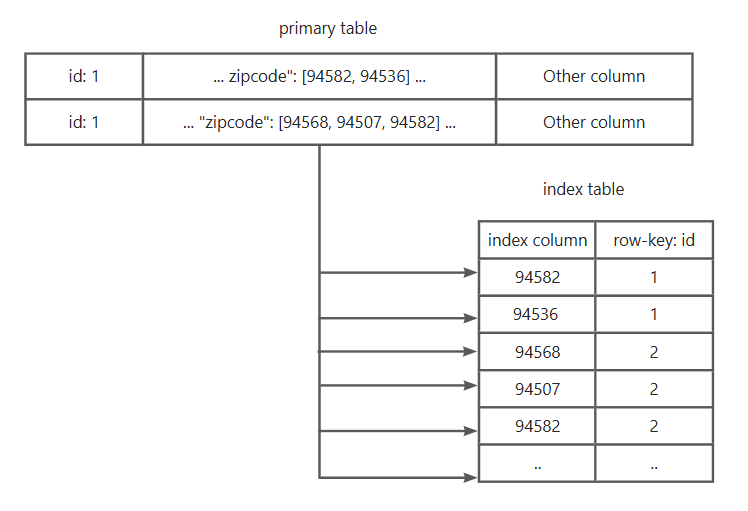
测试版本
OceanBase 数据库 V4.3.5 Hotfix1 版本。
创建多值索引
目前仅支持在建表的同时创建JSON多值索引,不支持后建多值索引。
obclient(root@mysql)[test]> CREATE TABLE customers (
  id BIGINT NOT NULL AUTO_INCREMENT PRIMARY KEY,
  modified DATETIME DEFAULT CURRENT_TIMESTAMP ON UPDATE CURRENT_TIMESTAMP,
  custinfo JSON,
  INDEX zips( (CAST(custinfo->'$.zipcode' AS UNSIGNED ARRAY)) )
);
Query OK, 0 rows affected (0.309 sec)

obclient(root@mysql)[test]> ALTER TABLE customers ADD INDEX zips( (CAST(custinfo->'$.zipcode' AS UNSIGNED ARRAY)) );
ERROR 1235 (0A000): build multivalue index afterward not supported

obclient(root@mysql)[test]> CREATE INDEX zips ON customers ( (CAST(custinfo->'$.zipcode' AS UNSIGNED ARRAY)) );
ERROR 1235 (0A000): build multivalue index afterward not supported
创建唯一多值索引
多值索引可以定义为唯一键。如果将其定义为唯一键,尝试插入已存在于多值索引中的值会返回重复键错误。
示例如下。
obclient(root@mysql)[test]> CREATE TABLE customers (
  id BIGINT not null primary key,
  modified BIGINT not null,
  custinfo JSON,
  UNIQUE INDEX zips1( (CAST(custinfo->'$.zipcode' AS UNSIGNED ARRAY)) )
);
Query OK, 0 rows affected (0.247 sec)

obclient(root@mysql)[test]> INSERT INTO customers VALUES
(10, 21, '{"user":"Jack","user_id":37,"zipcode":[94582,94536]}');
Query OK, 1 row affected (0.076 sec)

obclient(root@mysql)[test]> INSERT INTO customers VALUES
(11, 22, '{"user":"Jill","user_id":22,"zipcode":[94568,94507,94582]}');
ERROR 1062 (23000): Duplicate entry '94582' for key 'zips1'
创建复合多值索引
多值索引也可以定义为复合索引的一部分。 下面的示例中创建了一个复合索引,其中包括两个单值部分(id 列和 modified 列)和一个多值部分(custinfo列)。
obclient(root@mysql)[test]> CREATE TABLE customers (
  id BIGINT NOT NULL AUTO_INCREMENT PRIMARY KEY,
  modified DATETIME DEFAULT CURRENT_TIMESTAMP ON UPDATE CURRENT_TIMESTAMP,
  custinfo JSON,
  INDEX comp(id, modified, (CAST(custinfo->'$.zipcode' AS UNSIGNED ARRAY)))
);
Query OK, 0 rows affected (0.258 sec)
使用多值索引
当在 WHERE 子句中使用了以下函数时,优化器会自动使用多值索引来加快查询。
MEMBER OF()。
JSON_CONTAINS()。
JSON_OVERLAPS()。
测试如下。
obclient(root@mysql)[test]> CREATE TABLE customers (
  id BIGINT NOT NULL AUTO_INCREMENT PRIMARY KEY,
  modified DATETIME DEFAULT CURRENT_TIMESTAMP ON UPDATE CURRENT_TIMESTAMP,
  custinfo JSON,
  INDEX zips( (CAST(custinfo->'$.zipcode' AS UNSIGNED ARRAY)) )
);
Query OK, 0 rows affected (0.246 sec)

obclient(root@mysql)[test]> INSERT INTO customers VALUES
(NULL, NOW(), '{"user":"Jack","user_id":37,"zipcode":[94582,94536]}'),
(NULL, NOW(), '{"user":"Jill","user_id":22,"zipcode":[94568,94507,94582]}'),
(NULL, NOW(), '{"user":"Bob","user_id":31,"zipcode":[94477,94507]}'),
(NULL, NOW(), '{"user":"Mary","user_id":72,"zipcode":[94536]}'),
(NULL, NOW(), '{"user":"Ted","user_id":56,"zipcode":[94507,94582]}');
Query OK, 5 rows affected (0.078 sec)
Records: 5  Duplicates: 0  Warnings: 0

obclient(root@mysql)[test]> commit;
Query OK, 0 rows affected (0.000 sec)

obclient(root@mysql)[test]> SELECT * FROM customers WHERE 94507 MEMBER OF(custinfo->'$.zipcode');
+------+---------------------+-------------------------------------------------------------------+
| id   | modified            | custinfo                                                          |
+------+---------------------+-------------------------------------------------------------------+
|    2 | 2025-02-07 19:55:18 | {"user": "Jill", "user_id": 22, "zipcode": [94568, 94507, 94582]} |
|    3 | 2025-02-07 19:55:18 | {"user": "Bob", "user_id": 31, "zipcode": [94477, 94507]}         |
|    5 | 2025-02-07 19:55:18 | {"user": "Ted", "user_id": 56, "zipcode": [94507, 94582]}         |
+------+---------------------+-------------------------------------------------------------------+
3 rows in set (0.007 sec)

obclient(root@mysql)[test]> explain SELECT * FROM customers WHERE 94507 MEMBER OF(custinfo->'$.zipcode');
+----------------------------------------------------------------------------------------------------------------------------------------------------------+
| Query Plan                                                                                                                                               |
+----------------------------------------------------------------------------------------------------------------------------------------------------------+
| ===========================================================                                                                                              |
| |ID|OPERATOR        |NAME           |EST.ROWS|EST.TIME(us)|                                                                                              |
| -----------------------------------------------------------                                                                                              |
| |0 |TABLE RANGE SCAN|customers(zips)|2       |13          |                                                                                              |
| ===========================================================                                                                                              |
| Outputs & filters:                                                                                                                                       |
| -------------------------------------                                                                                                                    |
|   0 - output([customers.id], [customers.modified], [customers.custinfo]), filter([JSON_MEMBER_OF(94507, JSON_EXTRACT(customers.custinfo, '$.zipcode'))]) |
|       access([customers.id], [customers.custinfo], [customers.modified]), partitions(p0)                                                                 |
|       is_index_back=true, is_global_index=false, filter_before_indexback[false],                                                                         |
|       range_key([customers.SYS_NC_mvi_19], [customers.id], [customers.__doc_id_1738929311525882]), range(94507,MIN,MIN ; 94507,MAX,MAX)                  |
+----------------------------------------------------------------------------------------------------------------------------------------------------------+
11 rows in set (0.004 sec)

obclient(root@mysql)[test]> SELECT * FROM customers WHERE JSON_CONTAINS(custinfo->'$.zipcode', CAST('[94507,94582]' AS JSON));
+------+---------------------+-------------------------------------------------------------------+
| id   | modified            | custinfo                                                          |
+------+---------------------+-------------------------------------------------------------------+
|    2 | 2025-02-07 19:55:18 | {"user": "Jill", "user_id": 22, "zipcode": [94568, 94507, 94582]} |
|    5 | 2025-02-07 19:55:18 | {"user": "Ted", "user_id": 56, "zipcode": [94507, 94582]}         |
+------+---------------------+-------------------------------------------------------------------+
2 rows in set (0.005 sec)

obclient(root@mysql)[test]> explain SELECT * FROM customers WHERE JSON_CONTAINS(custinfo->'$.zipcode', CAST('[94507,94582]' AS JSON));
+--------------------------------------------------------------------------------------------------------------------------------------------------------------+
| Query Plan                                                                                                                                                   |
+--------------------------------------------------------------------------------------------------------------------------------------------------------------+
| ===========================================================                                                                                                  |
| |ID|OPERATOR        |NAME           |EST.ROWS|EST.TIME(us)|                                                                                                  |
| -----------------------------------------------------------                                                                                                  |
| |0 |TABLE RANGE SCAN|customers(zips)|3       |23          |                                                                                                  |
| ===========================================================                                                                                                  |
| Outputs & filters:                                                                                                                                           |
| -------------------------------------                                                                                                                        |
|   0 - output([customers.id], [customers.modified], [customers.custinfo]), filter([JSON_CONTAINS(JSON_EXTRACT(customers.custinfo, '$.zipcode'), cast('[94507, |
|       94582]', JSON(536870911)))])                                                                                                                           |
|       access([customers.id], [customers.custinfo], [customers.modified]), partitions(p0)                                                                     |
|       is_index_back=true, is_global_index=false, filter_before_indexback[false],                                                                             |
|       range_key([customers.SYS_NC_mvi_19], [customers.id], [customers.__doc_id_1738929311525882]), range(94507,MIN,MIN ; 94507,MAX,MAX), (94582,MIN,MIN      |
|       ; 94582,MAX,MAX)                                                                                                                                       |
+--------------------------------------------------------------------------------------------------------------------------------------------------------------+
13 rows in set (0.004 sec)

obclient(root@mysql)[test]> SELECT * FROM customers WHERE JSON_OVERLAPS(custinfo->'$.zipcode', CAST('[94507,94582]' AS JSON));
+------+---------------------+-------------------------------------------------------------------+
| id   | modified            | custinfo                                                          |
+------+---------------------+-------------------------------------------------------------------+
|    1 | 2025-02-07 19:55:18 | {"user": "Jack", "user_id": 37, "zipcode": [94582, 94536]}        |
|    2 | 2025-02-07 19:55:18 | {"user": "Jill", "user_id": 22, "zipcode": [94568, 94507, 94582]} |
|    3 | 2025-02-07 19:55:18 | {"user": "Bob", "user_id": 31, "zipcode": [94477, 94507]}         |
|    5 | 2025-02-07 19:55:18 | {"user": "Ted", "user_id": 56, "zipcode": [94507, 94582]}         |
+------+---------------------+-------------------------------------------------------------------+
4 rows in set (0.003 sec)

obclient(root@mysql)[test]> explain SELECT * FROM customers WHERE JSON_OVERLAPS(custinfo->'$.zipcode', CAST('[94507,94582]' AS JSON));
+--------------------------------------------------------------------------------------------------------------------------------------------------------------+
| Query Plan                                                                                                                                                   |
+--------------------------------------------------------------------------------------------------------------------------------------------------------------+
| ===========================================================                                                                                                  |
| |ID|OPERATOR        |NAME           |EST.ROWS|EST.TIME(us)|                                                                                                  |
| -----------------------------------------------------------                                                                                                  |
| |0 |TABLE RANGE SCAN|customers(zips)|3       |23          |                                                                                                  |
| ===========================================================                                                                                                  |
| Outputs & filters:                                                                                                                                           |
| -------------------------------------                                                                                                                        |
|   0 - output([customers.id], [customers.modified], [customers.custinfo]), filter([JSON_OVERLAPS(JSON_EXTRACT(customers.custinfo, '$.zipcode'), cast('[94507, |
|       94582]', JSON(536870911)))])                                                                                                                           |
|       access([customers.id], [customers.custinfo], [customers.modified]), partitions(p0)                                                                     |
|       is_index_back=true, is_global_index=false, filter_before_indexback[false],                                                                             |
|       range_key([customers.SYS_NC_mvi_19], [customers.id], [customers.__doc_id_1738929311525882]), range(94507,MIN,MIN ; 94507,MAX,MAX), (94582,MIN,MIN      |
|       ; 94582,MAX,MAX)                                                                                                                                       |
+--------------------------------------------------------------------------------------------------------------------------------------------------------------+
13 rows in set (0.005 sec)
DML语句中使用多值谓词
OceanBase 数据库 V4.3.5 版本中 JSON 多值索引完善了对复杂 DML 语句的支持,在 update、delete 等语句中可以支持多值谓词,同时支持了带多值索引回表的复杂 DML。
示例如下。
obclient(root@mysql)[test]> select * from customers;
+------+---------------------+-------------------------------------------------------------------+
| id   | modified            | custinfo                                                          |
+------+---------------------+-------------------------------------------------------------------+
|    1 | 2025-02-07 21:08:39 | {"user": "Jack", "user_id": 37, "zipcode": [94582, 94536]}        |
|    2 | 2025-02-07 21:08:39 | {"user": "Jill", "user_id": 22, "zipcode": [94568, 94507, 94582]} |
|    3 | 2025-02-07 21:08:39 | {"user": "Bob", "user_id": 31, "zipcode": [94477, 94507]}         |
|    4 | 2025-02-07 21:08:39 | {"user": "Mary", "user_id": 72, "zipcode": [94536]}               |
|    5 | 2025-02-07 21:08:39 | {"user": "Ted", "user_id": 56, "zipcode": [94507, 94582]}         |
+------+---------------------+-------------------------------------------------------------------+
5 rows in set (0.001 sec)

obclient(root@mysql)[test]> update customers set custinfo = json_replace(custinfo, '$.zipcode', CAST('[94508,94582]' as JSON)) WHERE JSON_CONTAINS(custinfo->'$.zipcode', CAST('[94507,94582]' AS JSON));
Query OK, 2 rows affected (0.008 sec)
Rows matched: 2  Changed: 2  Warnings: 0

obclient(root@mysql)[test]> select * from customers;
+------+---------------------+------------------------------------------------------------+
| id   | modified            | custinfo                                                   |
+------+---------------------+------------------------------------------------------------+
|    1 | 2025-02-07 21:08:39 | {"user": "Jack", "user_id": 37, "zipcode": [94582, 94536]} |
|    2 | 2025-02-07 21:24:08 | {"user": "Jill", "user_id": 22, "zipcode": [94508, 94582]} |
|    3 | 2025-02-07 21:08:39 | {"user": "Bob", "user_id": 31, "zipcode": [94477, 94507]}  |
|    4 | 2025-02-07 21:08:39 | {"user": "Mary", "user_id": 72, "zipcode": [94536]}        |
|    5 | 2025-02-07 21:24:08 | {"user": "Ted", "user_id": 56, "zipcode": [94508, 94582]}  |
+------+---------------------+------------------------------------------------------------+
5 rows in set (0.001 sec)

obclient(root@mysql)[test]> delete from customers where JSON_CONTAINS(custinfo->'$.zipcode', CAST('[94508,94582]' AS JSON));
Query OK, 2 rows affected (0.005 sec)

obclient(root@mysql)[test]> select * from customers;
+------+---------------------+------------------------------------------------------------+
| id   | modified            | custinfo                                                   |
+------+---------------------+------------------------------------------------------------+
|    1 | 2025-02-07 21:08:39 | {"user": "Jack", "user_id": 37, "zipcode": [94582, 94536]} |
|    3 | 2025-02-07 21:08:39 | {"user": "Bob", "user_id": 31, "zipcode": [94477, 94507]}  |
|    4 | 2025-02-07 21:08:39 | {"user": "Mary", "user_id": 72, "zipcode": [94536]}        |
+------+---------------------+------------------------------------------------------------+
3 rows in set (0.000 sec)
功能限制
只支持 MySQL 模式,不支持 Oracle 模式的 JSON 多值索引功能。
只支持预建索引,不支持后建索引。
只支持局部索引,不支持全局索引。
obclient(root@mysql)[test]> CREATE TABLE customers (
id BIGINT NOT NULL AUTO_INCREMENT PRIMARY KEY,
modified DATETIME DEFAULT CURRENT_TIMESTAMP ON UPDATE CURRENT_TIMESTAMP,
custinfo JSON,
INDEX zips( (CAST(custinfo->'$.zipcode' AS UNSIGNED ARRAY)) ) global
);
ERROR 1235 (0A000): Not supported feature or function
含多列的多值索引,必须是统一字符集。
只支持普通导入,不支持旁路导入。
影响租户
影响 OceanBase 数据库中的 SYS 租户和 Oracle 租户以及 MySQL 租户。
适用版本
OceanBase 数据库 V4.3.1 及之后版本(MySQL 模式,Oracle 模式目前还不支持 JSON多值索引)。


